GCP – Announcing MCP support in Apigee: Turn existing APIs into secure and governed agentic tools
Today, we expanded Google’s support for Model Context Protocol (MCP) with the release of fully-managed, remote MCP servers, giving developers worldwide consistent and enterprise-ready access to Google and Google Cloud services. This includes support for MCP in Apigee, which makes it possible for agents to use your secure, governed APIs and custom workflows cataloged in Apigee API hub, as tools to complete tasks for end users.
With Apigee’s support for MCP, you don’t need to make any changes to your existing APIs, write any code, or deploy and manage any local or remote MCP servers. Apigee uses your existing API specifications and manages the underlying infrastructure and transcoding, so that you can focus on the business logic for your agents.
Overview of Apigee’s MCP support
Apigee provides 30+ built-in policies for authorization, authentication, security, and governance controls to ensure that API interactions are consistently protected. Apigee’s debugging UI and analytics capabilities provide end-to-end visibility over those interactions and monitoring and alerting for traffic and performance issues.
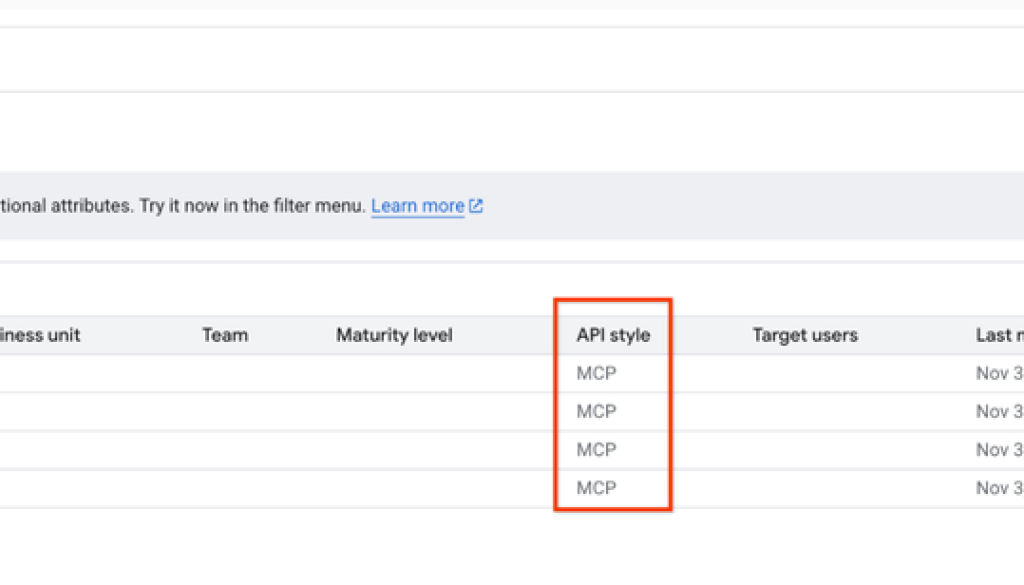
With Apigee’s support for MCP, you can turn your existing APIs into MCP tools, governed by the same set of policies and with full visibility over agentic interactions. You can do this by creating an “MCP proxy” in an environment group, specifying /mcp as the basepath and mcp.apigeex.com as the target URL, and including an OpenAPI specification. Once the MCP proxy is deployed, it will be registered in Apigee API hub as an “MCP” API.
Deployed MCP proxies are automatically registered in Apigee API hub
When a tools/list or tools/call request is made to the MCP endpoint, Apigee uses the operations documented in the OpenAPI spec as the MCP tools list. You can then bundle the MCP proxy in an API product, and apply granular quota and identity and access policies to ensure that only authorized MCP clients, agents, and developers can list and call those tools.
With this process you can, for example, designate specific API operations as MCP tools. You can then specify that an MCP tool for your “Payments” service can only be accessed by designated agents with known client identities and a legitimate need to use the tool.
You can then use Apigee Analytics to monitor MCP tool usage. And, with the recent launch of Apigee API insights, you can also use the new “Insights” tab in Apigee API hub’s catalog to view traffic and performance metrics for your MCP endpoints.
Benefits of Apigee’s approach to MCP support
Our main goal with MCP support in Apigee is to make sure that you can secure, govern, and monitor usage of MCP tools with the same policies and workflows in Apigee that you’re already familiar with.
What this means for you:
-
No added operational burden: You don’t need to set up and manage an MCP server for each of your APIs; just deploy an MCP proxy, and Apigee will take care of the rest. Apigee fully manages the MCP servers, transcoding, and protocol handling.
-
Tool observability and governance: Apigee’s built-in identity, authorization, and security policies can also be used to secure and govern your MCP endpoints and tools, and you can use Apigee analytics to monitor tool usage by MCP clients.
-
Comprehensive tool security: Apigee helps make sure that all agentic interactions are secure. For example, you can use Cloud Data Loss Prevention to classify and protect sensitive data passed from your tools, and use Model Armor to guard against prompt injection and jailbreaking attempts. You can make sure agents and users have the proper IAM permissions to invoke MCP tools, and view and fully debug the entire end-to-end flow of agentic interactions. You can also use Apigee Advanced API Security to keep your tools secure.
-
Centralized tool catalog: After you deploy an MCP proxy, Apigee automatically registers your MCP endpoint in Apigee API hub, along with your spec. This allows you to maintain a searchable, centralized tool catalog and promote tool reuse.
Using Apigee MCP tools with agent frameworks
Apigee’s MCP support is designed for maximum compatibility. Your secured Apigee MCP endpoints are usable with agents built using a variety of frameworks, including ADK, LangGraph, and other popular solutions across the AI ecosystem.
However, developers choosing Agent Development Kit (ADK) have an exclusive, streamlined advantage when developing agents within the Google ecosystem.
ADK is a flexible and modular framework for developing and deploying AI agents. While optimized for Gemini and the Google ecosystem, ADK is model-agnostic, deployment-agnostic, and is built for compatibility with other frameworks. ADK was designed to make agent development feel more like software development, to make it easier for developers to create, deploy, and orchestrate agentic architectures that range from simple tasks to complex workflows.
ADK includes a toolset for both Apigee and Application Integration, so that developers building custom agents with ADK can easily connect those agents to your MCP endpoints and tools that are governed and secured with Apigee. You can also use the ApigeeLLM wrapper for ADK to expose your LLM endpoint through an Apigee proxy, integrating governance into your agentic workflows. (Note: The ApigeeLLM wrapper is currently designed for use with Vertex AI and the Gemini API in Google AI Studio, but we’re planning to support other models and interfaces.)
Google Cloud also provides services for deploying custom agents. You can use Vertex AI Agent Engine to deploy your agents, and then put them in action across your organization using Gemini Enterprise.
Next steps
MCP support in Apigee is currently in preview use with customers. Please contact your Apigee or Google Cloud account team to access this feature.
Read More for the details.