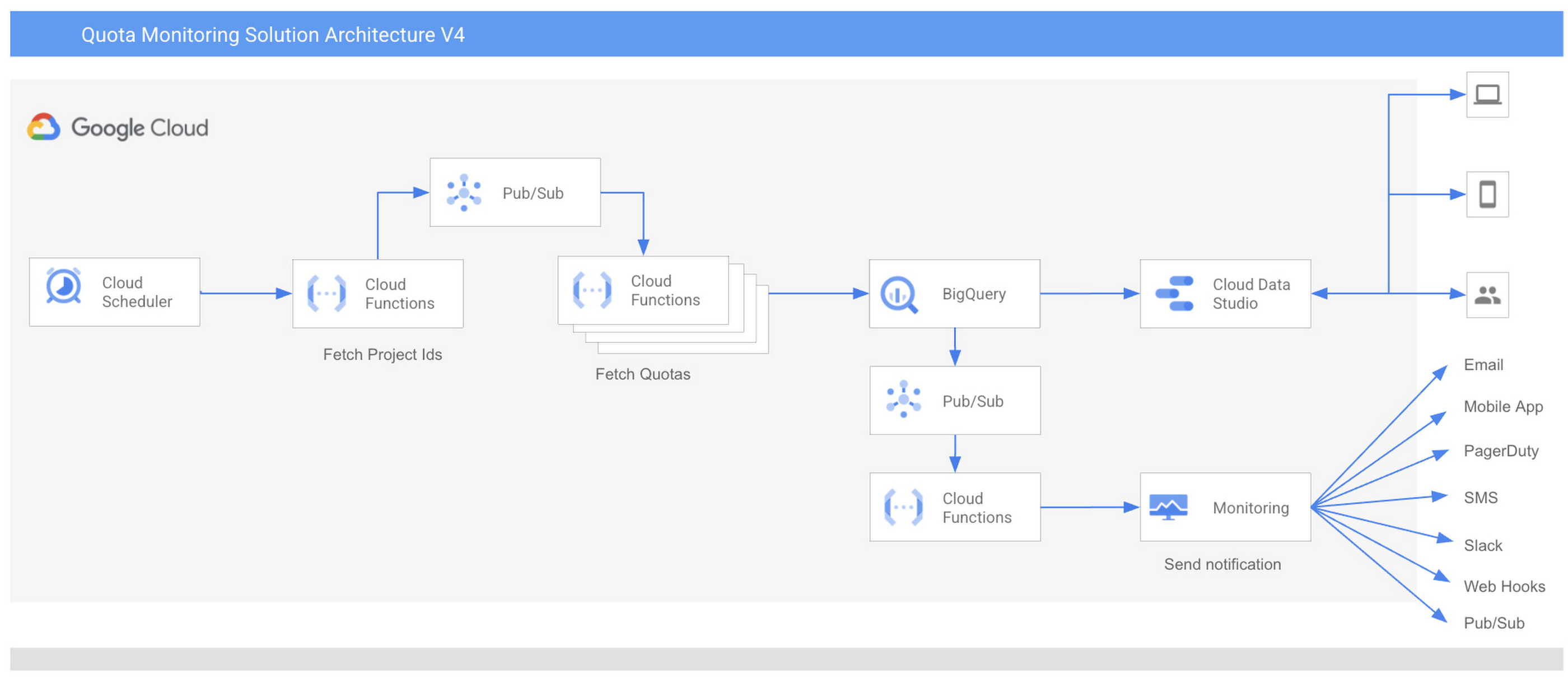
The solution includes a terraform script that you can deploy in a GCP project. This templates provisions the following resources in a GCP project:
Cloud Scheduler– Cloud Scheduler is a fully managed, enterprise-grade cron-job scheduler. It is used to trigger Cloud Functions at scheduled intervals.
Cloud Functions – Cloud Functions is an event-driven serverless compute platform. It contains the code logic to scan project quotas.
Pub/Sub– Pub/Sub allows services to communicate asynchronously, with very low latency. It is used to support event-driven application design and high scalability.
BigQuery – BigQuery is a serverless, highly scalable data warehouse. It is used to store data for project quotas.
Data Studio – Data Studio is a Dashboard and reporting tool. It is used to display quotas across multiple projects in a single view. You can configure other visualization tools of your choice, like Looker. In the future, we will also provide a Looker-based Dashboard.
Cloud Monitoring Custom Log Metric and Alert – Google Cloud Monitoring offers logging and alerting capabilities. This is used to enable alerting that gives timely awareness to quota issues in your cloud applications so you can request a quota increase quickly.
In this solution, Cloud Scheduler also works as an interface for you to provide configurations:
You can provide folder IDs, organization IDs as parent nodes for which you want to monitor quotas. Parent nodes can be a single folder ID or organization ID or list of folder IDs or Organization IDs.
You can also configure metric threshold and email addresses for Alerting.
Currently, you can receive alerts via Email, Mobile App, PagerDuty, SMS, Slack, Web Hooks and Pub/Sub.
Metric threshold is used to generate alerts. For example you can choose 70% or 80% as a threshold to generate alerts.
The alerts will be sent to the configure alerting channel.
Please note:
Any changes in the projects like addition of new projects or deletion of existing projects will be reflected automatically in the subsequent scheduled scanning.
Any changes in the GCP Cloud Monitoring APIs will be reflected. For example, the introduction of new quota metrics will be reflected automatically in the solution without making any code changes.
Any changes in the Cloud Monitoring alert notification channels will also be available automatically without the need to make any code changes.
1.1 Workflow
If we put all these components together, the workflow starts at Cloud Scheduler. You can provide your preferences of folders and organization IDs, metric threshold, email addresses and configure to run the job at scheduled intervals.
Create a service account and grant access to view quota usage in the target organization/s or folder/s.
Cloud scheduler automatically runs at configured frequency, for example daily, and passes user configurations to Cloud Functions.
Based on the service account access, the first Cloud Functions instance lists projects of the parent node, generates the list of project IDs, and publishes them to the Pub/Sub topic.
The second Cloud Function instance is triggered from the message generated in the previous step and receives the project IDs as a separate message from the topic.
Upon receiving the project IDs, the second Cloud Function instance fetches the quotas for each project using publicly available GCP cloud monitoring APIs.
Cloud Function loads the project’s quota data in the BigQuery table.
Alerting
A scheduled query on the BigQuery table filters all quotas with usage greater than the configured threshold.
The third Cloud Function’s instance logs the data for metrics in Cloud Logging.
Preconfigured custom log metrics in Google Cloud Monitoring create alerts, which are sent to the configured notification channel.
Reporting
Once the data is loaded into BigQuery, Data Studio fetches the data from BigQuery and displays it in the Dashboard in a single view across all projects and metrics.
Data Studio Dashboard is easy to use, customize, and share.
You can also configure scheduled reporting from this Dashboard to receive Quota monitoring reports in email as PDF.
2. Deployment Process
The Google Cloud custom quota monitoring solution can be deployed in a few minutes using the deployment guide and accompanying terraform scripts. Following are three simple steps:
Create a service account and grant access
Run terraform script to provision all resources in a Google Cloud project
Configure the Data Studio Dashboard
For step-by-step details, please see the Readme section of the deployment guide on PSO Github.
3. How to Customize?
This is an open source code available on Google Cloud PSO Github repository. You can fork the repository and customize as per your requirements. During the deployment, Terraform downloads the code. The code and the data stays in the customer’s environment.
4. Summary
Quota Monitoring solution lets you to view and monitor quotas for Google Cloud services from one central location for an organization or folder. Service Quotas enables you to easily and consistently track quota usage and receive alerts to save time and effort in setting up quota monitoring for new projects.
If you have questions or suggestions for this solution, please fill out this form or reach out to us at pso-quota-monitoring@google.com
Acknowledgement
We would like to thank Darpan Shah, Raghavendra Kyatham, and Marlon Pimentel for their contribution in building the solution as well as Rahul Khandkar, Karina Rivera, and Rohan Karne for sponsoring this project. We would also like to extend our gratitude to all Technical Account Managers who helped prototype and roll out the solution globally, especially Naveen Nelapudi, Vijay Narayanan, Rohit Iyer, Emily Wong, and Isha Rana.