


About
Posts by :
GCP – Standardize your cloud billing data with the new FOCUS BigQuery view
Post Content
Read More for the details.

GCP – Our Solar API now covers more rooftops worldwide
We’re taking our solar data and expanding coverage–far and wide. After launching the Solar API as part of our new suite of Environment APIs, we’ve continued to expand our coverage. We’re now able to provide valuable information to businesses in the solar industry for more than 472 million buildings in over 40 countries. This includes newly expanded coverage to over 95% of all buildings in the United States–nearly double our previous coverage.
Historically, our solar insights were computed using elevation maps and imagery captured by low flying airplanes in limited regions. With new advancements in machine learning, we’re now using a larger set of Google Map’s aerial imagery to produce detailed elevation maps and accurate solar projections for millions of buildings that previously had no data available. Our AI-enhanced height maps were internally evaluated based on geometric accuracy and predicted energy outputs, and developed closely with direct feedback from solar industry leaders from around the world. These advances help expand our comprehensive building data, solar potential insights, and detailed rooftop imagery broadly throughout North America, Europe, and Oceania. These advancements set the stage for future coverage expansions within our currently covered countries as well as expansions to new countries where data is not readily available.
Given the impact that access to reliable solar data can have on deploying renewable energy, we’re making it a top priority to roll out coverage across geographies where there is significant demand for this data. Since launch, solar companies have requested expanded coverage so they can unlock new markets, grow their business, and increase the amount of solar.
“Google has been adding more data, which has been great. Whenever that happens, we’re happy, because we’re paying less for higher quality imagery,” explains Walid Halty, CEO at Mona Lee. “Google’s Solar API has proven time and time again, where it’s available, it’s the best.”
Benefits of integrating the Solar API
Our Solar API is being used to optimize solar panel arrays, make solar assessments and proposals more accurate and efficient, and to educate the public about transitioning to solar energy by showing homeowners the feasibility for their individual properties. Here are two examples of how our customers are using the Solar API:
Demand IQ AI chatbot for solar assessments
Demand IQ uses the Solar API to help solar companies provide online, accurate, real-time rooftop assessments to homeowners considering a transition to solar energy. By digitizing the solar shopping experience, companies can increase transparency, realize more conversions, and cut costs–while providing homeowners with useful, engaging information so they can make an informed decision.
“To support the transition to solar energy, we need to help customers make informed decisions, and we need to help solar providers to answer their questions with up-to-date, accurate data,” explains Austin Rosenbaum, CEO, Demand IQ. “With Demand IQ and the power of data from the Solar API, we now do that in real-time.”
To support energy efficiency at scale, MyHEAT uses solar data, insights, and imagery to educate residents, utility companies, and cities on the solar potential of their homes and buildings. The Solar API significantly reduces the time needed to deliver solutions, while also improving efficiency, accuracy, and the quality of their 3D map imagery.
We’ll be at the Intersolar North America and Energy Storage North America conference at the San Diego Convention Center from January 17-19. Stop by booth #649, where we’ll have live presentations at 11 am and 2 pm each day to share more about how our Solar API can enhance your solar offering.
For more information on Google Maps Platform, visit our website.
Read More for the details.
GCP – Linear optimizes data and scalability with vector search support on Google Cloud SQL
Editor’s note: Since its founding in 2019, Linear has been enhancing global product development workflows for businesses through its project and issue-tracking system. Leveraging the power of Cloud SQL for PostgreSQL, Linear was able to keep pace with its expanding customer base–improving the efficiency, scalability, and reliability of data management, scaling up into the tens of terabytes without increasing engineering effort.
Linear’s mission is to empower product teams to ship great software. We’ve spent the last few years building a comprehensive project and issue tracking system to help users streamline workflows throughout the product development process. While we started as an issue tracker, we’ve grown our application into a powerful project management platform for cross-functional teams and users around the world.
For instance, Linear Asks allows organizations to manage request workflows like bug and feature requests via Slack, streamlining collaboration for individuals without Linear accounts who regularly work with our platform. Additionally, we introduced Similar Issues, a feature that prevents duplicate or overlapping tickets and ensures cleaner and more accurate data representation for growing organizations.
As our customers grow their businesses, they have more users on the platform and issues to track, which means more need for workflow and product management software. We’re focused on supporting this growth while continuing to deliver on stability, quality, performance, and the features that support complex technical configurations alongside a great user experience.
Seeking a scalable database with vector search
In our initial development phase, we had a PostgreSQL database with pgvector extension hosted on a PaaS that wasn’t indexed or used for production workloads. For production workloads we needed to upgrade our databases and find a solution with strong vector search support, since it’s the best way to identify and group similar issues based on shared characteristics or patterns. By representing issues as vectors and finding similarities, we can quickly identify duplicate or related issues. This functionality streamlines bug tracking and helps our customers address issues more effectively, saving them time and resources while improving their overall workflows.
We explored several new entrants in the database market that focus on storing vectors and ended up trialing several. However, we faced challenges with speed of indexing and unacceptable downtime while scaling, not to mention the relatively high cost for a feature that wasn’t the core of the product. Given Linear’s existing data volume and our goals for finding a cost-efficient solution, we opted for CloudSQL for PostgreSQL once support for pgvector was added. We were impressed by its scalability and reliability. This choice was also compatible with our existing database usage, models, ORM, etc. and this meant the learning curve was non-existent for our team.
Our migration process from development to production was challenging at first due to the sheer size and volume of vectors we had to work with for the production dataset. However, after partitioning the issues table into 300 segments, we were able to successfully index each partition. The migration process followed a standard approach of creating a follower from the existing PostgreSQL database and proceeded smoothly.
Google Cloud powers Linear’s real-time sync
Today, our primary operational database uses Cloud SQL for PostgreSQL. Since Cloud SQL for PostgreSQL includes the pgvector extension, we were able to set up an additional database to store vectors for our similarity-search features. This is achieved by encoding the semantic meaning of issues into a vector using OpenAI ada embeddings, then combining it with other filters to help us identify similar relevant entities.
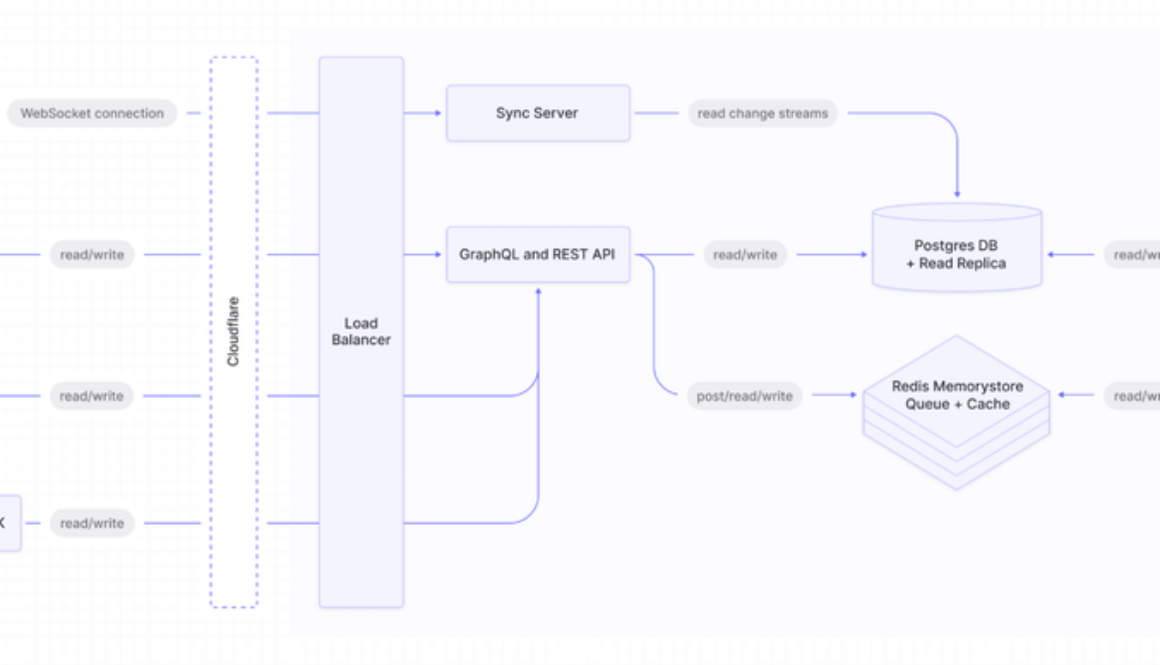
A simplified diagram of Linear’s architecture
In terms of our architecture design, Linear’s web and desktop clients seamlessly sync with our backend through real-time connections. On Google Cloud, we operate synchronized WebSocket servers, both public and private GraphQL APIs, and task runners for background jobs.
Each of these functions as a Kubernetes workload that can scale independently. Our technology stack is fully built with NodeJS and Typescript, and our primary database solution is Cloud SQL for PostgreSQL, a choice we’re confident with. Additionally, we use Google’s managed Memorystore for Redis as an event bus and cache.
Seamless scaling and future innovation with Cloud SQL for PostgreSQL
Cloud SQL for PostgreSQL has proven invaluable for Linear. Because we do not have a dedicated operations team, relying on managed services is crucial. It allows us to scale our database smoothly into tens of terabytes of data without requiring extensive engineering efforts, which is fantastic for our operations and enables engineering to spend more time building user-facing features.
Furthermore, our customers have provided us with great feedback, specifically regarding Linear’s ability to identify duplicate issues when they report a bug. Now, when a user creates a new issue, the application first suggests potential duplicates. Additionally, when handling customer tickets through customer support application integrations like Zendesk, Linear displays possible related bugs that have already been logged.
Looking ahead, we envision integrating machine learning (ML) into Linear to enhance the user experience, automate tasks, and offer intelligent suggestions within the product. We’re also committed to further developing our similarity search features, expanding beyond vector similarity to incorporate additional signals into our calculations. We firmly believe that Google Cloud will be instrumental in helping us realize this vision.
Get started:
Discover how Cloud SQL for PostgreSQL can help you run your business. Learn more about Memorystore for Redis.Start a free trial today! New Google Cloud customers get $300 in free credits.
Read More for the details.
GCP – How the new Google Cloud to Neo4j Dataflow template streamlines data movement
Neo4j provides a graph database that offers capabilities for handling complex relationships and traversing vast amounts of interconnected data. Google Cloud complements this with robust infrastructure for hosting and managing data-intensive workloads. Together, Neo4j and Google Cloud have developed a new Dataflow template, Google Cloud to Neo4j (docs, guide), that you can try from the Google Cloud console.
In this blog post, we discuss how the Google Cloud to Neo4j template can help data engineers and data scientists who need to streamline the movement of data from Google Cloud to Neo4j database, to enable enhanced data exploration and analysis with the Neo4j database.
Importing BigQuery and Cloud Storage data to Neo4j
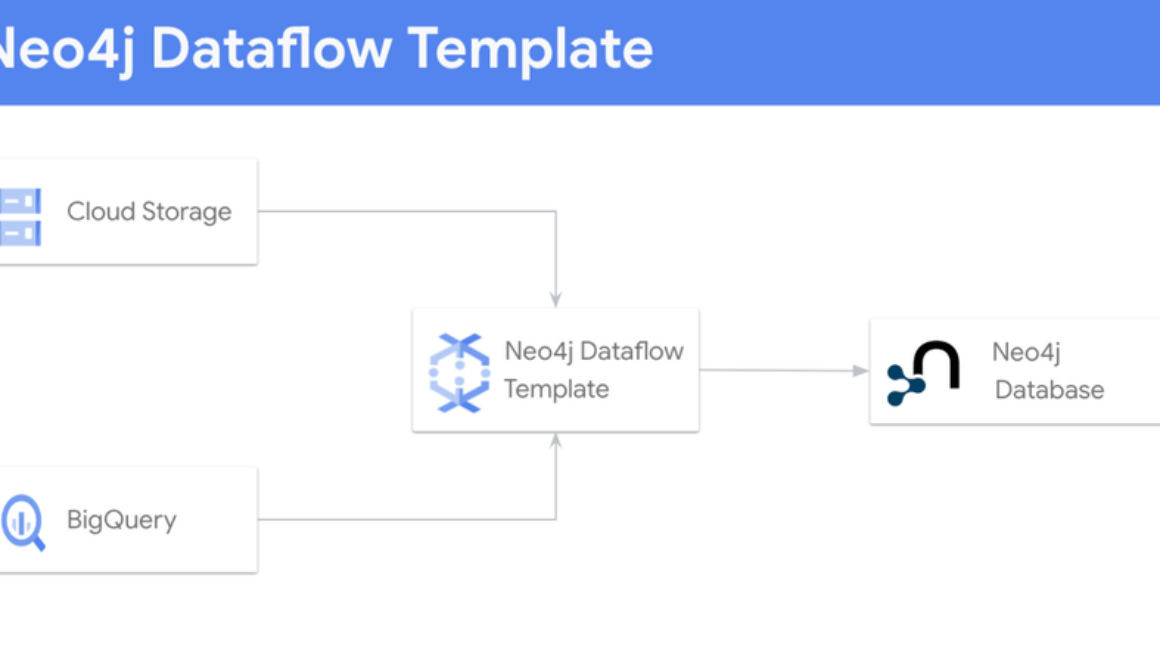
Many customers leverage BigQuery, Google Cloud’s fully managed and serverless data warehouse, and Cloud Storage to centralize and analyze diverse data from various source systems, regardless of formats. This integrated approach simplifies the complex task of managing data from different sources while maintaining stringent security measures. With the ability to store and process data efficiently in one location, organizations can analyze, forecast, and predict trends, yielding valuable insights for informed decision-making. BigQuery is the linchpin for aggregating and analyzing data. Read on to see how the Google Cloud to Neo4j Dataflow template streamlines the movement of data from BigQuery and Cloud Storage to Neo4j’s Aura DB, a fully managed cloud graph database service running on Google Cloud.
Using the Dataflow template
Unlike typical data integration methods like Python-based notebooks and Spark environments, Dataflow simplifies the process entirely, and doesn’t require any coding. It’s also free during idle periods, and leverages Google Cloud’s security framework for enhanced trust and reliability of your data workflows.
Dataflow is a strong solution for orchestrating data movement across diverse systems. As a managed service, Dataflow caters to an extensive array of data processing patterns, enabling customers to easily deploy batch and streaming data processing pipelines. And to simplify data integration, Dataflow offers an array of templates tailored to various source systems.
Fig 1: Architecture Diagram of Dataflow from Google Cloud to Neo4j
With the Google Cloud to Neo4j template, you can opt for the flex or classic template. For this illustration, we employ the flex template, which leverages just two configuration files: the Neo4j connection metadata file, and the Job Description file.
The Neo4j partner GitHub repository provides a wealth of resources that show how to use this template. The repository houses sample configurations, screenshots and all the instructions required to set up the data pipeline. Additionally, there are step-by-step instructions that guide you through the process of transferring data from BigQuery to a Neo4j database.
Once you have these two configuration files (Neo4j connection metadata file and job configuration file), you are ready to use the dataflow template to move data from Google Cloud to Neo4j. Here is the screenshot of the dataflow configuration page:
You can find the detailed documentation on this Dataflow template on the Neo4j documentation portal. Please refer to the following links: Dataflow Flex Template for BigQuery to Neo4j and Dataflow Flex Template for Google Cloud to Neo4j.
Simplify data migration between Google Cloud and Neo4j
The Google Cloud to Neo4j Dataflow template makes it easier to use Neo4j’s graph database with Google Cloud’s data processing suite. To get started, check out the following resources:
Explore Neo4j within the Google Cloud Marketplace.Review the Google Cloud documentation on the Dataflow template.Walkthrough the step-by-step guide for setting up your pipeline and creating Neo4J config files that can be passed into the pipeline.Jump to Cloud Console to create your first job now!
Read More for the details.
GCP – Troubleshooting distributed applications: Using traces and logs together for root-cause analysis
When troubleshooting distributed applications that are made up of numerous services, traces can help with pinpointing the source of the problem, so you can implement quick mitigating measures like rollbacks. However, not all application issues can be mitigated with rollbacks, and you need to undertake a root-cause analysis. Application logs often provide the level of detail necessary to understand code paths taken during abnormal execution of a service call. As a developer, the challenge is finding the right logs.
Let’s take a look at how you can use Cloud Trace, Google Cloud’s distributed tracing tool, and Cloud Logging together to help you perform root-cause analysis.
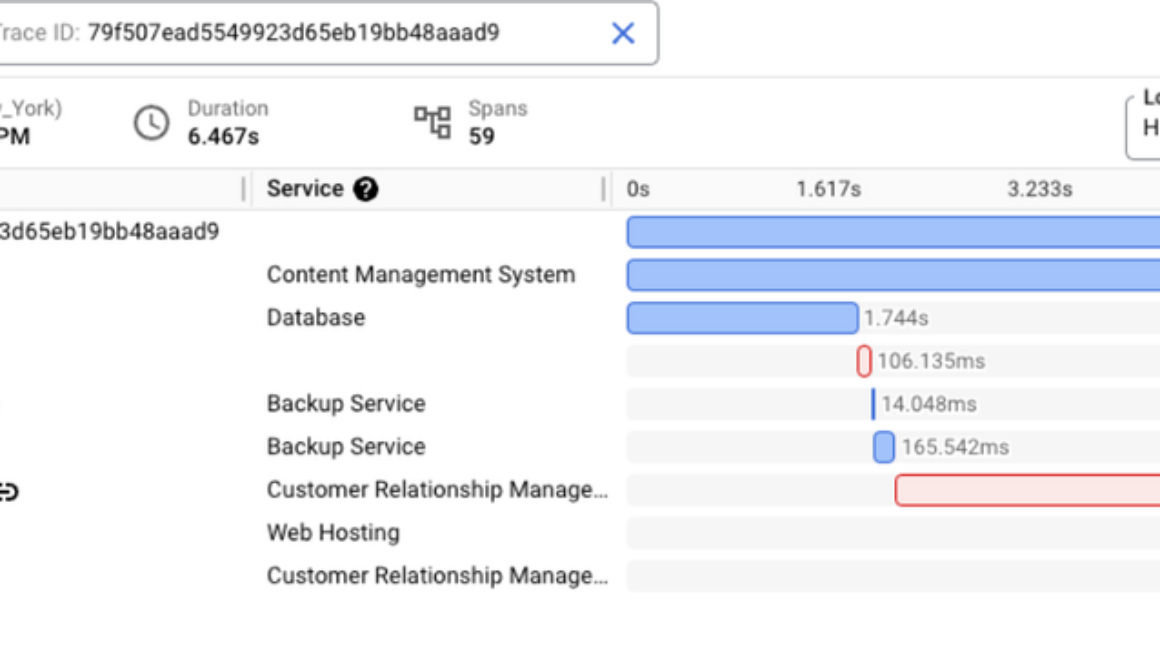
Imagine you’re a developer working on the Customer Relationship Management service (CRM) that is part of a retail webstore app. You were paged because there’s an ongoing incident for the webstore app and the error rate for the CRM service was spiking. You take a look at the CRM service’s error rate dashboard and notice a trace exemplar that you can view in Cloud Trace:
The Trace details view in Cloud Trace shows two spans with errors: update_userand update_product. This leads you to suspect that one of these calls is part of the problem. You notice that the update_product call is part of your CRM service and check to see if these errors started happening after a recent update to this service. If there’s a correlation between the errors and an update to the service, rolling back the service might be a potential mitigation.
Let’s assume that there is no correlation between updates to the CRM service and these errors. In this case, a rollback may not be helpful and further diagnosis is needed to understand the problem. A next possible step is to look at logs from this service.
The Trace details view in Cloud Trace allows users to select different views for displaying logs within the trace — selecting “Show expanded” displays all related logs under their respective spans.
In this example, you can see that there are three database-related logs under the update_product span. After retrying a few times, the attempts to connect to the database from the CRM service have failed.
Behind the scenes, Cloud Trace is querying Cloud Logging to retrieve logs that are both in the same timeframe as the trace and reference the traceID and the spanID. Once retrieved, Cloud Trace presents these logs as child nodes under the associated span, which makes the correlation between the service call and the logs emitted during the execution of that service very clear.
You know that other services are connecting to the same database successfully, so this is likely a configuration error. You check to see if there were any config updates to the database connection from the CRM service and notice that there was one recently. Reviewing the pull request for this config update leads you to believe that an error in this config was the source of the issue. You quickly update the config and deploy it to production to address the issue.
In the above example, Cloud Trace and Cloud Logging work together to combine traces and logs into a powerful way to perform root cause analysis when mitigating measures like rollbacks are not enough.
If you’re curious about how to instrument properly for logs and trace correlation to work, here are some examples:
You can also get started by trying out OpenTelemetry instrumentation with Cloud Trace in this codelab or by watching this webinar.
Read More for the details.
GCP – Databases upgrade made easy with in-place major version upgrades on Cloud SQL
Using Cloud SQL, our fully managed relational database service is a powerful way to streamline your database operations and focus on innovation. Cloud SQL handles the complexities of database administration for you, delivering a robust and secure relational database platform that’s scalable and highly available, all the while simplifying management tasks and reducing operational costs.
As an open and fully managed database service, Cloud SQL supports multiple versions of the database engines it offers, allowing you to choose the version of MySQL, PostgreSQL, or Microsoft SQL Server that best suits your needs. While Cloud SQL offers this flexibility to maintain older versions of database engines, there are substantial advantages to staying current with the latest releases. Newer versions often bring performance enhancements, security upgrades, and expanded feature sets, empowering you to optimize your applications and safeguard your data. To maximize the benefits of Cloud SQL and ensure the long-term stability and security of your applications, it’s essential to move away from database engine versions that have reached their end of life (EOL).
In this blog, we will discuss key advantages as well as best practices to transition to a newer version of MySQL and PostgreSQL by leveraging Cloud SQL’s in-place major version upgrade feature. We will also discuss strategies to successfully perform major version upgrade on your primary and replica instances..
What is Cloud SQL’s in-place major version upgrade feature?
Cloud SQL’s in-place major version upgrade feature is a built-in functionality that allows you to upgrade your MySQL or PostgreSQL database instance to a newer major version directly (a.k.a. in-place upgrade) within the Cloud SQL platform. This removes the need for manual data migration, complex configuration changes, and the associated lengthy downtime. Further, one of the biggest advantages of this approach is that you can retain the name, IP address, and other settings of your current instance after the upgrade.
We recommend you plan and test major version upgrades thoroughly. One of the strategies to test includes cloning the current primary instance and performing a major version upgrade on the clone. This will help iron out issues upfront, and give you the confidence to perform a production upgrade.
Cloud SQL’s major version upgrade feature varies slightly between MySQL and PostgreSQL. Please see the dedicated sections below for detailed information.
Cloud SQL for MySQL
MySQL community version 5.7 reached end of life in October 2023. If you are still running MySQL 5.6 and 5.7, we recommend upgrading to MySQL 8.0, which offers next-generation query capabilities, improved performance, and enhanced security. For example:
MySQL 8.0’s instant DDL drastically speeds up table alterations while allowing concurrent DML changes.InnoDB received optimizations for various workloads, including read-write, IO-bound, and high-contention scenarios.SKIP LOCKED and NOWAIT options prevent lock waits.Window functions in MySQL 8.0 simplify query logic, and CTEs enable reusable temporary result sets.MySQL 8.0 enhances JSON functionality and adds robust security features.Replication performance is significantly improved, leading to faster data synchronization. Parallel replication is enabled by default.New features like descending indexes and invisible indexes contribute to further performance enhancements.
Please click here for more details.
What should I do to upgrade to MySQL 8.0?
You can leverage Cloud SQL’s major version upgrade feature to upgrade to 8.0. Pre-check has already been incorporated into the workflow but you have the option to run it separately as well. You can use the Upgrade Checker Utility in the MySQL shell to run a pre-check. Before upgrading, review your current primary/replica topology and devise a plan accordingly.
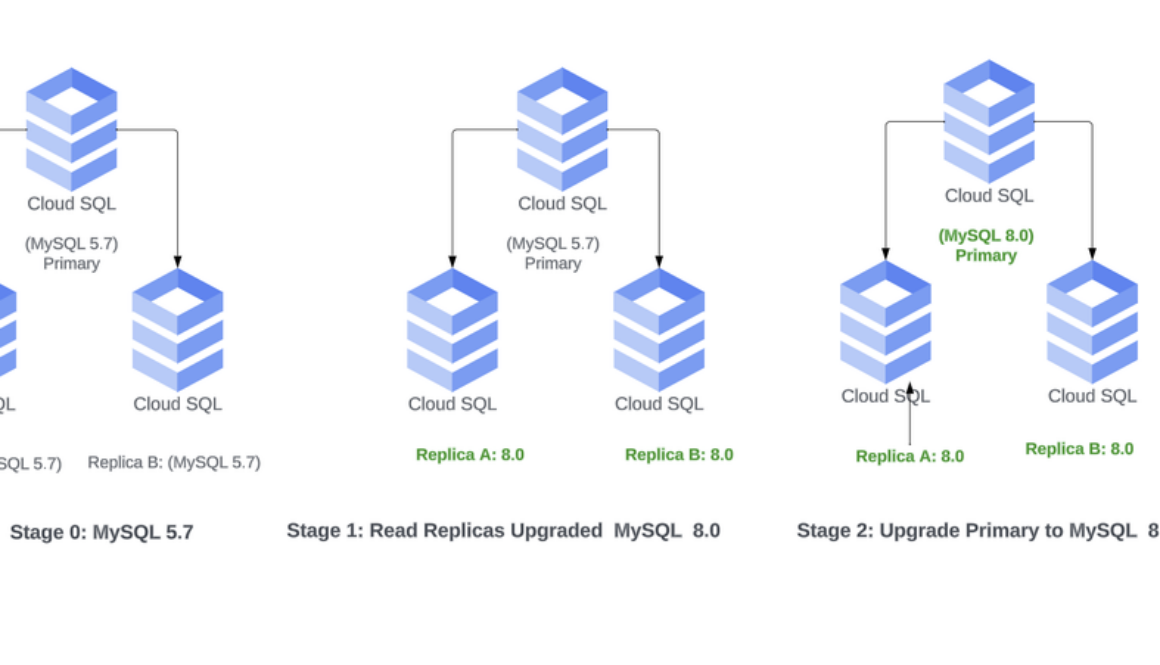
Upgrade using major version upgrade: If you have a primary instance with no read replicas, you can upgrade the instance in-place with Cloud SQL’s major version upgrade feature. MySQL allows replication from lower to higher major versions. This is beneficial if you have read replicas, as you can upgrade your read replicas prior to upgrading the primary instance.
The diagram below shows the stages of a major version upgrade.
Note: In this scenario, IP addresses will be maintained.
Upgrade using cascading replicas: You can leverage cascading replicas along with major version upgrades for the scenarios below. This approach allows you to:
fall back to the old primary with its full topology intactset up an entire new stack in a new zone or a new region in addition to the current deployment
For example, Everflow, a Google Cloud customer that makes a partner marketing platform, leveraged cascading replicas and in-place major version upgrade to orchestrate a smooth MySQL upgrade to 8.0, with minimal downtime or disruption for their users.
To perform the major version upgrade using cascading replicas, please refer to the diagram and perform the following steps.
1. Create a read replica from the current 5.7 primary instance either to an existing or new zone/region.
2. Upgrade the replica to 8.0 via the major version upgrade feature.
3. Enable replication and create replicas as needed under the new 8.0 read replica.
4. Prep the application for IP address changes in advance to minimize downtime.
5. Route traffic and prep the application for switching over to the new master. Cloud Load Balancing can help do this efficiently.
Note: Consider this a transition period and try to keep the time for version mismatch short.
6, When you’re ready, promote the 8.0 read replica.
7. Delete the old primary MySQL 5.7 instance.
Note: As mentioned earlier, the above process requires IP address changes to the application. Ideally, IP address changes should be done before promoting the new read replica to minimize disruption when the cutover is performed.
Cloud SQL for PostgreSQL
PostgreSQL updates major versions yearly with a five-year support window. PostgreSQL 11 reached end-of-life in November, 2023. While you can upgrade to PostgreSQL 12 or 13, considering PostgreSQL’s end-of-life policy, we recommend upgrading to PostgreSQL 14 or later versions. PostgreSQL 14 and subsequent versions introduce several new features and enhancements that provide significant benefits. Here are some of the highlights:
Performance improvements including parallel query execution for GROUP BY and JOIN operations, and faster VACUUM and REINDEX operations.Enhancements to logical replication with support for filtering, row-level replay, and replication to multiple destinations, making it more flexible and scalable for various use cases.Security enhancements and advanced features like improved JSON functionality and enhanced table partitioning.
For additional details click here.
Considerations and strategies for upgrading to PostgreSQL 14+
If your database is on an older version, we recommend upgrading to a newer version. There are different strategies that can be used to accomplish this. Since PostgreSQL does not support cross-version replication, upgrading the primary instance while the instance is replicating to the read replicas is not possible. In addition, upgrading read replicas prior to the primary instance may not be feasible. Hence, the upgrade flow involves upgrading primary instances first. Before proceeding, replication needs to be disabled for existing replicas. After the primary has been upgraded, read replicas can be upgraded one by one and replication can be re-enabled. Alternatively, you can drop read replicas and recreate them after the primary instance has been upgraded.
Upgrade via MVU: We recommend leveraging Cloud SQL’s major version upgrade feature for upgrading to newer versions of PostgreSQL (14.0+). With in-place upgrades, you can retain the name, IP address, and other settings of your current instance after the upgrade. The Cloud SQL for PostgreSQL in-place upgrade operation uses the pg_upgrade utility. Please make sure to test upgrades on beta or staging environments first, or clone the instance as mentioned above before you proceed. Cloud SQL for PostgreSQL major version upgrade performs pre-validations steps and backups on your behalf.
Unlocking higher availability and price/performance with Enterprise Plus
Upgrading to MySQL 8.0 or PostgreSQL 14 or 15 unlocks the ability to perform a quick in-place upgrade to Cloud SQL Enterprise Plus Edition, which is a powerhouse of advanced functionality. Cloud SQL Enterprise Plus Edition offers:
99.99% availability SLA inclusive of maintenanceNear-zero downtime planned maintenance with <10s instance downtimeUp to 3x faster throughput with the optional Data Cache and faster hardware for larger scale and optimal performanceSupport for larger machine configurations with up to 128 vCPU and 864 GB of memory, compared to 96 vCPU and 624 GB in Enterprise editionSupport for up to 35 days of Point In Time Recovery (PITR) compared to seven days in Enterprise edition
In-place upgrade to Cloud SQL Enterprise Plus edition takes just a few minutes with a downtime of less than 60 seconds. To learn more, click here.
Final thoughts
Let’s revisit why upgrading makes sense: It’s an investment in the security, performance, and capabilities of your database infrastructure. By embracing the latest advancements, you can safeguard your data, optimize your applications, and empower your organization. With Cloud SQL’s in-place major version upgrade feature, you can perform a streamlined and efficient upgrade of your databases, ensuring a smooth transition to the latest version. Click here to get started.
Read More for the details.
GCP – Making BigQuery ML feature preprocessing reusable and modular
In machine learning, transforming raw data into meaningful features, a preprocessing step known as feature engineering, is a critical step. BigQuery ML has made significant strides in this area, empowering data scientists and ML engineers with a versatile set of preprocessing functions for feature engineering (see our previous blog). These transformations can even be seamlessly embedded within models, ensuring their portability beyond BigQuery to serving environments like Vertex AI. Now we are taking this a step further in BigQuery ML, introducing a unique approach to feature engineering: modularity. This allows for easy reuse of feature pipelines within BigQuery, while also enabling direct portability to Vertex AI.
A companion tutorial is provided with this blog — try the new features out today!
Feature preprocessing with the TRANSFORM clause
When creating a model in BigQuery ML, the CREATE MODEL statement has the option to include a TRANSFORM statement. This allows for custom specifications for converting columns from the SELECT statement into features of the model by using preprocessing functions. This is a great advantage because the statistics used for transformation are based on the data used at model creation. This provides consistency of preprocessing similar to other frameworks — like the Transform component of the TFX framework, which helps eliminate training/serving skew. Even without a TRANSFORM statement, automatic transformations are applied based on the model type and data type.
In the following example, an excerpt from the accompanying tutorial, there are preprocessing steps applied prior to input for imputing missing values. There is also embedded preprocessing with the TRANSFORM statement for scaling the columns. This scaling gets embedded with the model and applies to the input data, which is already imputed prior to input here. The advantage of the embedded scaling functions is that the model remembers the calculated parameters used in scaling to apply later on when using the model for inference.
code_block<ListValue: [StructValue([(‘code’, “CREATE OR REPLACE MODEL `statmike-mlops-349915.bqml.embedded_preprocessing`rn TRANSFORM(rn species, sex, island, split,rn ML.ROBUST_SCALER(body_mass_g) OVER() AS body_mass_g,rn ML.STANDARD_SCALER(culmen_length_mm) OVER() AS culmen_length_mm,rn ML.STANDARD_SCALER(culmen_depth_mm) OVER() AS culmen_depth_mm,rn ML.STANDARD_SCALER(flipper_length_mm) OVER() AS flipper_length_mmrn )rn OPTIONS(rn model_type = ‘BOOSTED_TREE_CLASSIFIER’,rn input_label_cols = [‘species’],rn data_split_method = ‘CUSTOM’,rn data_split_col = ‘split’,rn model_registry = ‘VERTEX_AI’,rn VERTEX_AI_MODEL_ID = ‘bqml_embedded_preprocessing’rn )rnASrnSELECT species, island,rn CASE WHEN split = ‘TRAIN’ THEN FALSE ELSE TRUE END AS split,rn ML.IMPUTER(sex, ‘most_frequent’) OVER() AS sex,rn ML.IMPUTER(body_mass_g, ‘median’) OVER() AS body_mass_g,rn ML.IMPUTER(culmen_length_mm, ‘mean’) OVER() AS culmen_length_mm,rn ML.IMPUTER(culmen_depth_mm, ‘mean’) OVER() AS culmen_depth_mm,rn ML.IMPUTER(flipper_length_mm, ‘mean’) OVER() AS flipper_length_mm, rnFROM `statmike-mlops-349915.bqml.feature-engineering-source`”), (‘language’, ”), (‘caption’, <wagtail.rich_text.RichText object at 0x3e21009d8d00>)])]>
Reusable preprocessing with the ML.TRANSFORM function
With the new ML.TRANSFORM table function, the feature engineering part of the model can be called directly. This enables several helpful workflows, including:
Process a table to review preprocessed featuresUse the transformations of one model to transform the inputs of another model
In the example below (from the tutorial), the ML.TRANSFORM function is applied directly to the input data without having to recalculate the scaling parameters using the original training data. This allows for efficient reuse of the transformations for future models, further data review, and for model monitoring calculations detecting skew and drift.
code_block<ListValue: [StructValue([(‘code’, ‘SELECT *rnFROM ML.TRANSFORM(rn MODEL `statmike-mlops-349915.bqml.embedded_preprocessing`,rn (SELECT *rn FROM `statmike-mlops-349915.bqml.feature-engineering-source`rn )rn)’), (‘language’, ”), (‘caption’, <wagtail.rich_text.RichText object at 0x3e21009d8cd0>)])]>
Modular preprocessing With TRANSFORM_ONLY Models
Take reusability to a completely modular state by creating transformation only models. This works like other models by using CREATE MODEL with a TRANSFORM statement and using the value model_type = TRANSFORM_ONLY. In other words, it creates a model object of just the feature engineering part of the pipeline. That means the transform model can be reused to transform inputs of any CREATE MODEL statement as well, even registering the model to the Vertex AI Model Registry for use in ML pipelines outside of BigQuery. You can even EXPORT the model to GCS for complete portability.
The following excerpt from the tutorial shows a regular CREATE MODEL statement being used to compile the TRANSFORM statement as a model. In this case, all the imputation steps are being stored together in a single model object that will remember the mean/median values from the training data and be able to apply them for imputation on future records — even at inference time.
code_block<ListValue: [StructValue([(‘code’, “CREATE OR REPLACE MODEL `statmike-mlops-349915.bqml.modular_preprocessing_impute`rn TRANSFORM(rn ML.IMPUTER(sex, ‘most_frequent’) OVER() AS sex,rn ML.IMPUTER(body_mass_g, ‘median’) OVER() AS body_mass_g,rn ML.IMPUTER(culmen_length_mm, ‘mean’) OVER() AS culmen_length_mm,rn ML.IMPUTER(culmen_depth_mm, ‘mean’) OVER() AS culmen_depth_mm,rn ML.IMPUTER(flipper_length_mm, ‘mean’) OVER() AS flipper_length_mmrn )rn OPTIONS(rn model_type = ‘TRANSFORM_ONLY’,rn model_registry = ‘VERTEX_AI’,rn VERTEX_AI_MODEL_ID = ‘bqml_modular_preprocessing_impute’rn )rnASrnSELECT * rnFROM `statmike-mlops-349915.bqml.feature-engineering-source`rnWHERE split = ‘TRAIN'”), (‘language’, ”), (‘caption’, <wagtail.rich_text.RichText object at 0x3e2100920970>)])]>
The TRANSFORM_ONLY model can be used like any other model with the same ML.TRANSFORM function we covered above.
code_block<ListValue: [StructValue([(‘code’, “SELECT *rnFROM ML.TRANSFORM(rn MODEL `statmike-mlops-349915.bqml.modular_preprocessing_scale`,rn (SELECT * FROM `statmike-mlops-349915.bqml.feature-engineering-source`’)rn)”), (‘language’, ”), (‘caption’, <wagtail.rich_text.RichText object at 0x3e2100920550>)])]>
Feature pipelines
With the modularity of TRANSFORM_ONLY models it is possible to use more than one in a feature pipeline. The BigQuery SQL Query syntax WITH clause (CTEs) makes the feature pipeline highly readable. This idea makes feature level transformation models, like a feature store, easily usable with modularity.
As an example of this idea first, create a TRANSFORM_ONLY model for each individual feature: body_mass_g, culmen_length_mm, culmen_depth_mm, flipper_length_mm. Here, these are used for scaling of columns into features – just like the full model we create at the beginning.
For body_mass_g:
code_block<ListValue: [StructValue([(‘code’, “CREATE OR REPLACE MODEL `statmike-mlops-349915.bqml.modular_preprocessing_scale_body_mass_g`rn TRANSFORM(rnt * EXCEPT(body_mass_g),rn ML.ROBUST_SCALER(body_mass_g) OVER() AS body_mass_g,rn model_registry = ‘VERTEX_AI’,rn VERTEX_AI_MODEL_ID = ‘bqml_modular_preprocessing_scale_body_mass_g’rn )rn OPTIONS(model_type = ‘TRANSFORM_ONLY’)rnASrnSELECT * rnFROM `statmike-mlops-349915.bqml.feature-engineering-source`rnWHERE split = ‘TRAIN'”), (‘language’, ”), (‘caption’, <wagtail.rich_text.RichText object at 0x3e2100920c70>)])]>
For culmen_length_mm:
code_block<ListValue: [StructValue([(‘code’, “CREATE OR REPLACE MODEL `statmike-mlops-349915.bqml.modular_preprocessing_scale_culmen_length_mm`rn TRANSFORM(rnt * EXCEPT(culmen_length_mm),rn ML.STANDARD_SCALER(culmen_length_mm) OVER() AS culmen_length_mm,rn model_registry = ‘VERTEX_AI’,rn VERTEX_AI_MODEL_ID = ‘bqml_modular_preprocessing_scale_culmen_length_mm’rn )rn OPTIONS(model_type = ‘TRANSFORM_ONLY’)rnASrnSELECT * rnFROM `statmike-mlops-349915.bqml.feature-engineering-source`rnWHERE split = ‘TRAIN'”), (‘language’, ”), (‘caption’, <wagtail.rich_text.RichText object at 0x3e2100920280>)])]>
For culmen_depth_mm:
code_block<ListValue: [StructValue([(‘code’, “CREATE OR REPLACE MODEL `statmike-mlops-349915.bqml.modular_preprocessing_scale_culmen_depth_mm`rn TRANSFORM(rnt * EXCEPT(culmen_depth_mm),rn ML.STANDARD_SCALER(culmen_depth_mm) OVER() AS culmen_depth_mm,rn model_registry = ‘VERTEX_AI’,rn VERTEX_AI_MODEL_ID = ‘bqml_modular_preprocessing_scale_culmen_depth_mm’rn )rn OPTIONS(model_type = ‘TRANSFORM_ONLY’)rnASrnSELECT * rnFROM `statmike-mlops-349915.bqml.feature-engineering-source`rnWHERE split = ‘TRAIN’rnrnFor flipper_length_mm:rnCREATE OR REPLACE MODEL `statmike-mlops-349915.bqml.modular_preprocessing_scale_flipper_length_mm`rn TRANSFORM(rnt * EXCEPT(flipper_length_mm),rn ML.STANDARD_SCALER(flipper_length_mm) OVER() AS flipper_length_mm,rn model_registry = ‘VERTEX_AI’,rn VERTEX_AI_MODEL_ID = ‘bqml_modular_preprocessing_scale_flipper_length_mm’rn )rn OPTIONS(model_type = ‘TRANSFORM_ONLY’)rnASrnSELECT * rnFROM `statmike-mlops-349915.bqml.feature-engineering-source`rnWHERE split = ‘TRAIN'”), (‘language’, ”), (‘caption’, <wagtail.rich_text.RichText object at 0x3e2100920a60>)])]>
Now, with CTEs, a feature pipeline can be as easy as the following and even packaged as a view:
code_block<ListValue: [StructValue([(‘code’, ‘CREATE OR REPLACE VIEW `statmike-mlops-349915.bqml.feature-engineering-preprocessing` ASrnWITHrn raw AS (rn SELECT *rn FROM `statmike-mlops-349915.bqml.feature-engineering-source`rn ),rn impute AS (rn SELECT *rn FROM ML.TRANSFORM(rn MODEL `statmike-mlops-349915.bqml.modular_preprocessing_impute`,rn (SELECT * FROM raw)rn )rn ),rn feature_1 AS (rn SELECT *rn FROM ML.TRANSFORM(rn MODEL `statmike-mlops-349915.bqml.modular_preprocessing_scale_body_mass_g`,rn (SELECT * FROM impute)rn )rn ),rn feature_2 AS (rn SELECT *rn FROM ML.TRANSFORM(rn MODEL `statmike-mlops-349915.bqml.modular_preprocessing_scale_culmen_length_mm`,rn (SELECT * FROM feature_1)rn )rn ),rn feature_3 AS (rn SELECT *rn FROM ML.TRANSFORM(rn MODEL `statmike-mlops-349915.bqml.modular_preprocessing_scale_culmen_depth_mm`,rn (SELECT * FROM feature_2)rn )rn ),rn feature_4 AS (rn SELECT *rn FROM ML.TRANSFORM(rn MODEL `statmike-mlops-349915.bqml.modular_preprocessing_scale_flipper_length_mm`,rn (SELECT * FROM feature_3)rn )rn )rnSELECT *rnFROM feature_4’), (‘language’, ”), (‘caption’, <wagtail.rich_text.RichText object at 0x3e2100920250>)])]>
And creating the original model from above using this modular feature pipeline will look like the following which selects directly from the feature preprocessing pipeline created as a view above:
code_block<ListValue: [StructValue([(‘code’, “CREATE OR REPLACE MODEL `statmike-mlops-349915.bqml.modular_preprocessing`rn OPTIONS(rn model_type = ‘BOOSTED_TREE_CLASSIFIER’,rn input_label_cols = [‘species’],rn data_split_method = ‘CUSTOM’,rn data_split_col = ‘split’,rn model_registry = ‘VERTEX_AI’,rn VERTEX_AI_MODEL_ID = ‘bqml_modular_preprocessing’rn )rnASrnSELECT * EXCEPT(split),rn CASE WHEN split = ‘TRAIN’ THEN FALSE ELSE TRUE END AS splitrnFROM `statmike-mlops-349915.bqml.feature-engineering-preprocessing”), (‘language’, ”), (‘caption’, <wagtail.rich_text.RichText object at 0x3e2100920070>)])]>
This level of modularity and reusability brings the activities of MLOps into the familiar syntax and flow of SQL.
But there are times when models need to be used outside of the data warehouse, for example online predictions or edge applications. Notice how the models above were created with the parameter VERTEX_AI_MODEL_ID. This means they have automatically been registered in the Vertex AI Model Registry where they are just a step away from being deployed to a Vertex AI Prediction Endpoint. Also, like other BigQuery ML models, these models can be exported to Cloud Storage by using the EXPORT MODEL statement for complete portability.
Conclusion
BigQuery ML’s new reusable and modular feature engineering are powerful tools that can make it easier to build and maintain machine learning pipelines and power MLOps. With modular preprocessing, you can create transformation only models that can also be reused in other models or even exported to Vertex AI. This modularity even enables feature pipelines directly in SQL. This can save you time, improve accuracy, prevent training/seving skew, all while simplifying maintenance. To learn more about feature engineering with BigQuery, try out the tutorial and read more about feature engineering with BigQuery ML.
Read More for the details.

GCP – Laying the foundation for a career in platform engineering
Imagine that you’re an engineer at the company Acme Corp and you’ve been tasked with some big projects: integrating and delivering software using CI/CD and automation, as well as implementing data-driven metrics and observability tools. But many of your fellow engineers are struggling because there’s too much cognitive load — think deploying and automating Kubernetes clusters, configuring CI/CD pipelines, and worrying about security. You realize that to support the scale and growth of your company, you have to think differently about solving these challenges. This is where platform engineering might help you.
Platform engineering is “the practice of planning and providing such computing platforms to developers and users and encompasses all parts of platforms and their capabilities — their people, processes, policies and technologies; as well as the desired business outcomes that drive them,” writes the Cloud Native Computing Foundation (CNCF). This emerging discipline incorporates lessons learned from the DevOps revolution, recent Cloud Native developments in Kubernetes and serverless, as well as advances in observability and SRE.
A career in platform engineering, meanwhile, means becoming part of a product team focused on delivering software, tools, and services. Whether you’re just starting your IT career as a young graduate or you’re already a highly experienced developer or engineer, platform engineering offers growth opportunities and the ability to gain new technical skills.
Read on for an overview of the platform engineering field, including an introduction to what platform engineers do and the skills required. We also discuss the importance of user-centricity and having a product mindset, and provide some tips for setting goals and avoiding common pitfalls.
Common attributes of a platform engineer
So, what are some of the things that are expected of a platform engineer? Generally speaking, the role requires a mix of technical and people skills — job-related competencies that are necessary to complete work, as well as personal qualities and traits that impact how the role is approached. You can learn some of them to get started down the platform engineering career path, however there is no expectation that you need to know all of them to be successful, as these skillsets will often be distributed across your team. Here are some of the different attributes of a platform engineer:
Takes a customer-centric approach — being a reliable partner for engineering groups, sharing knowledge, working with other teams including software developers, SREs and Product ManagersFamiliar with DevSecOps practicesAvid learner, problem solver, detail-orientated, and able to communicate effectively across teamsAble to articulate the benefits of the platform engineering approach to fellow colleagues and engineersApplies a product mindset for the platform, e.g., using customer user journeys and friction logs
Given its particular significance in the Platform Engineering realm, let’s delve into the customer-centric approach from the list above.
The design loop and the significance of customer focus
If platforms are first and foremost a product, as the CNCF Platforms White Paper suggests, the focus is on its users. From the Google DORA Research 2023 we know that user focus is key: “Teams that focus on the user have 40% higher organizational performance than teams that don’t.”
At Google we believe that if we focus on the user everything else will follow — a key part of our philosophy. Having an empathetic user mindset requires a deep understanding of the needs and demands of your users, which is achieved through interviews, systematic statistics, metrics and data. You gather the data by focusing on both quantitative and qualitative metrics.
For example, you might decide to adopt Google’s HEART (Happiness, Engagement, Adoption, Retention, Task Success) framework, covered in detail in this whitepaper. As a platform engineer, you might be especially interested in the perceived “happiness” of your users with the offered platform services; you probably also want to measure and track platform adoption as well as (potential) retention of the offerings. Why are users coming to you or leaving? What is missing and could be improved in the next platform design sprint? Or perhaps you might want to create a friction log that documents the hurdles your users face when using your platform services. Ideally you can also become your own customer and use your own platform offerings, engaging with the friction log and users’ journeys through the platform.
The platform engineering design loop
We believe that an effective way to start thinking about platform engineering is to imagine a platform engineering design loop with you as a platform engineer at the center of it. You improve your customer focus by conducting user research that helps you understand their priorities better. You build empathy for them by documenting friction logs and other types of experiments. The platform backlog is where your team makes decisions on the engineering product portfolio, focusing on the platform’s contribution to your company’s value streams. Having a product mindset helps understand users’ needs, have a clear vision and roadmap, prioritize user features, documentation, and be open to product enhancements. Finally, once you have delivered the initial release of your platform, you continue iterating in this loop, making the platform better with every iteration.
What does a platform engineer actually do?
All this being said, a platform engineer performs a variety of tasks within a larger platform engineering group. Of course, nobody can do everything and you will require specialization, but here are some of the topics you might want to focus on:
Google Cloud services
Container runtimes: Google Kubernetes Engine, Cloud RunCompute runtimes: Compute Engine, Google Cloud VMware EngineDatabases: Spanner, Bigtable, Cloud SQLBuild and maintain the internal developer portalSupport developer tooling: Cloud WorkstationsMaintain CI/CD: Cloud Build, Cloud Deploy and Artifact RegistryImplement compliance as a code for selected supported golden paths using Infrastructure Manager and Policy Controller, helping to reduce cognitive load on developers and allowing for faster time to deployment.
Architecture
Gain a deep understanding of infrastructure and application architectureCo-writing with developers and support the golden paths through the use of Infrastructure as CodeCreate fantastic documentation as for example explained in our courses on technical writing. Don’t forget that architecture decision records are a key part of your engineering documentation.
Operations and reliability
Site Reliability Engineering – Adopt best practices for reliable operations of your platformSecurity Engineering – Compliance, horizontal controls, and guardrails for your platform
Engineering backlog
Use a backlog to list outstanding tasks and prioritize a portfolio of engineering work. The bulk of the focus should be on resolving the backlog of requests, with some additional time set aside for both continuous improvement and experimentation.Experimenting and innovating with new technology – This is an essential task for platform engineers, for example learning new services and features to better improve your platform.
Our industry has been focusing a lot on shifting complexity “left” to allow for better tested, integrated and secure code. In fact, here at Google we strongly believe that in addition to that, a platform effort can help you “shift down” this complexity. Of course, nobody can do everything (think about “cognitive load”), not even a superstar platform engineer like you!
What platform engineers should avoid ?
In addition to all the things that newly minted platform engineers should be doing, here are some things not to do:
Failing to prioritize the needs of developers and neglecting them from the design loopActing as a catch all for random tasks: Prioritizing and establishing the right culture is critical, and failing to do so will lead to burnout and lack of productivity (as shared in the State of DevOps Report 2023 report)Stagnating: Continual learning is not just a job perk, it’s a core part of engineers’ daily tasksExhibiting hero engineer syndrome: Instead, spread out skills across the group and work at a sustainable paceExpecting immediate adoption upon building the platform without evangelism, education, and gaining developers’ trust
These are just some of the common pitfalls that we’ve seen so far.
Platform engineers are the backbone of modern software delivery
Platform engineers are essential for the success of a modern enterprise software strategy, responsible for creating and maintaining the platforms that developers use to build and deploy applications. In today’s world, where software is constantly evolving, platform engineers are a key force to providing scalable software services and keep users as their primary focus. They carefully understand the demands and needs of their internal customers, combining their technology expertise with the knowledge of latest developments in the industry.
Finally, here are some further resources to aid in your platform engineering learning journey.
The book Software Engineering at Google covers creating a sustainable software ecosystem by diving into culture, processes and toolsGoogle SRE Books and workshopsDORA.dev – research into the capabilities that drive software delivery and operations performanceGoogle Cloud certifications -> Cloud Architect, Cloud DevOps Engineer, Cloud Developer, Cloud Security Engineer, Cloud Network Engineer
Read More for the details.
GCP – How Deutsche Bank achieved high availability and scalability with Spanner
Deutsche Bank is the leading German bank with strong European roots and a global network. The bank provides financial services to companies, governments, institutional investors, small and medium-sized businesses and private individuals.
For its German retail banking business, the bank recently completed the consolidation of two separate IT systems — Deutsche Bank and Postbank — to create one modern IT platform. This migration of roughly 19 million Postbank product contracts alongside the data of 12 million customers into the IT systems of Deutsche Bank was one of the largest and most complex technology migration projects in the history of the European banking industry.
As part of this modernization, the bank opted to design an entirely new online banking platform, partnering with Google Cloud for their migration from traditional on-premises servers, to the cloud. An integral functionality in enabling this migration, as apparent in the first production instance for 5 million Postbank customers, is Spanner, Google Cloud’s fully managed database service. Spanner’s high availability, external consistency, and infinite horizontal scalability made it the ideal choice for this business critical application. Read on to learn about the benefits that Deutsche Bank achieved from migrating to Spanner, and some best practices it developed to reliably and efficiently scale the platform.
Scaling in high availability environments
Scaling in high availability environments can be challenging, but Spanner does all the heavy lifting for Deutsche Bank. Spanner scales infinitely and allows Deutsche Bank to start small and easily scale up and down as needed.
In a traditional on-prem project, fixed resources would have been assigned to the online banking databases, provisioned high enough to respond to customer requests quickly even during peaks. In such a setup, the resources remain unused most of the time, as the online banking load profile varies based on the time of day (more specifically the amount of traffic of online users at a given time). Traffic is low overnight, increasing sharply in the morning to a high load throughout the day, before dropping again in the evening hours. Spanner supports elasticity with horizontal scaling based on nodes that can be added and removed at any time, without disrupting any active workloads.
The amount of nodes can be changed via the Google Cloud console, gcloud and the REST API. For automation, Google Cloud provides an open source Autoscaler that runs entirely on Google Cloud. The bank utilized Autoscaler in all environments (including non-production environments) to maximize cost-efficiency while still ensuring the provisioning of relevant Spanner capacity, for a seamless user experience.
For any components subject to high availability requirements, the autoscaler used to manage those components must be highly available, too. Below are some of the bank’s experiences — the lessons it learned from using it, and the contributions that will soon be given back to the open-source community.
Faster instance scale up
By default, the Autoscaler checks Spanner instances once per minute. To scale out as early as possible, this interval can be shortened, which increases the frequency of Autoscaler querying the Cloud Monitoring API. This change, along with choosing the right scaling methods, helped the bank to fulfill its latency service level objectives.
Multi-cluster deployment
Projects running a high availability GKE cluster should consider deploying the Spanner Autoscaler on GKE over Cloud Functions because it can be deployed to multiple regions, which mitigates issues potentially caused by a regional outage. To avoid race conditions between the poller-pods, simple semaphore logic can be added so that only one pod manages the Spanner resources at any given time. This is simple to do, since the Autoscaler already persists a state in either Firestore or Spanner.
Manageable complexity
Customizing Spanner Autoscaler does not require rocket scientist expertise. All changes can be made without touching the Autoscaler’s poller-core or scaler-core. Semaphore handling and monitoring integration can be implemented in custom wrappers, like the wrappers provided by Google Cloud in the respective poller and scaler folders. For a multi-cluster deployment, you can amend the exemplary kpt files or add custom helm charts, selecting the option that best suits your needs.
Decouple configuration from deployment
When multiple teams are working with Spanner instances, it can be inconvenient to deploy the Autoscaler each time the scaling configuration changes. To avoid this, Deutsche bank fetches the instance configuration from sources external to the image and deployment.
There are two ways to do this:
Store the configuration separately from the instance, e.g., in Cloud StorageAdd the configuration to the instance itself, e.g., by setting appropriate Spanner instance labels via Terraform
To read the instance configuration and build the poller’s internal instances configuration on the fly, the Spanner googleapis provide convenient methods to list and access either files in buckets or Spanner instances along with their metadata such as labels.
If you are using Terraform, it’s a good idea to exclude the Spanner instance processing units from still being managed by Terraform after the instance creation. Any terraform apply run would otherwise reset the autoscaled processing units to the fixed value set in the Terraform state. Terraform provides a lifecycle ignore_changes meta-argument that will do the trick.
Scale at will
The Autoscaler default metrics work well for most use cases. In special cases where scaling needs to be based on different parameters, custom metrics can be configured on an instance level.
A decoupled configuration makes it easy to create custom metrics and test them upfront. By making the custom metric part of the compiled image, using it on an instance level becomes less error prone. By following this approach, scaling a particular instance won’t accidentally stop because of a typo made in a metric definition during a configuration change.
By default, Autoscaler determines scaling decisions based on current storage utilization, 24-hour rolling CPU load, and current high priority CPU load. In cases where scaling parameters differ from this default, i.e., on medium-priority CPU load, custom metrics can be set in less than one minute.
Scale ahead of traffic
One minor shortcoming of the Autoscaler is its inability to compensate for sudden load peaks in real time. To compensate for expected peaks, it would be advisable to temporarily increase the minimum processing unit’s configuration. A solution could be easily implemented by decoupling the Autoscaler’s instance configuration from the Autoscaler image.
If changing the configuration isn’t an option, you can either send a POST request to the scaler’s metric endpoint or script gcloud commands to update the timestamps for the last scaling operation in the Autoscaler’s state database and set the instance processing units directly. The first solution may cause concurrent scaling operations, in which you should be aware of the Autoscaler’s internal cooldown settings. By default, the instance will be scaled in again after 30 minutes for scale-in and 5 minutes for scale-out events. The second solution would fix the processing units to any value of your choice for n minutes by manipulating the state database timestamps.
Conclusion
The open-source Autoscaler is a valuable tool for balancing cost control and performance needs when using Spanner. Autoscaler automatically scales your database instances up and down based on load to avoid over-provisioning, increasing cost savings.
The Autoscaler is easy to set up and runs on Google Cloud. Google provides the Autoscaler as open source, which allows full customization of the scaling logic. The core project team at Deutsche Bank worked closely with Google to further improve the tool’s stability and is excited to contribute its enhancements back to the open source community in the near future.
To learn more about the open-source Autoscaler for Spanner, follow the official documentation. You can read more about the Deutsche Bank and Google Cloud partnership in the official Deutsche Bank press release.
Read More for the details.
GCP – Cloud switching just got easier: Removing data transfer fees when moving off Google Cloud
At Google Cloud, we work to support a thriving cloud ecosystem that is open, secure, and interoperable. When customers’ business needs evolve, the cloud should be flexible enough to accommodate those changes.
Starting today, Google Cloud customers who wish to stop using Google Cloud and migrate their data to another cloud provider and/or on premises, can take advantage of free network data transfer to migrate their data out of Google Cloud. This applies to all customers globally. You can learn more here.
Eliminating data transfer fees for switching cloud providers will make it easier for customers to change their cloud provider; however, it does not solve the fundamental issue that prevents many customers from working with their preferred cloud provider in the first place: restrictive and unfair licensing practices.
Certain legacy providers leverage their on-premises software monopolies to create cloud monopolies, using restrictive licensing practices that lock in customers and warp competition.
The complex web of licensing restrictions includes picking and choosing who their customers can work with and how; charging 5x the cost if customers decide to use certain competitors’ clouds; and limiting interoperability of must-have software with competitors’ cloud infrastructure. These and other restrictions have no technical basis and may impose a 300% cost increase to customers. In contrast, the cost for customers to migrate data out of a cloud provider is minimal.
Making it easier for customers to move from one provider to another does little to improve choice if customers remain locked in with restrictive licenses. Customers should choose a cloud provider because it makes sense for their business, not because their legacy provider has locked them in with overly restrictive contracting terms or punitive licensing practices.
The promise of the cloud is to allow businesses and governments to seamlessly scale their technology use. Today’s announcement builds on the multiple measures in recent months to provide more value and improve data transfer for large and small organizations running workloads on Google Cloud.
We will continue to be vocal in our efforts to advocate on behalf of our cloud customers — many of whom raise concerns about legacy providers’ licensing restrictions directly with us. Much more must be done to end the restrictive licensing practices that are the true barrier to customer choice and competition in the cloud market.
Read More for the details.
GCP – Tech Empowerment Day helps underserved students explore modern technology
On October 4th, Los Angeles County hosted its second annual Tech Empowerment Day to celebrate Digital Inclusion Week at the Los Angeles Memorial Coliseum. This event is part of L.A.’s Delete the Divide initiative, which supports underserved communities with technology resources. A founding sponsor of Tech Empowerment Day in 2022, Google Cloud again served as a key partner in ensuring students gain hands-on experiences with modern technologies. The 2023 event featured 40 booths from tech companies, including Google Public Sector, that students could freely explore.
Tech Empowerment Day serves as a catalyst for students, educators, and school administrators to spark change within their communities. Students explore how technology can align with their interests in areas like gaming, cybersecurity, software development, augmented reality, and AI. Teachers and administrators can observe skills-based learning techniques to introduce students to engaging STEM education
The Google Public Sector booth showcased how Google Cardboard can be an effective way for students and teachers to bring immersive lessons into their classrooms. As a simple VR viewer that uses cardboard and a smartphone to create a VR experience, Google Cardboard offered students access to an exciting, hands-on technology experience. Students were also thrilled to assemble and take home their own Cardboard viewer. Bringing a piece of pioneering technology to their families and community helps increase exposure and furthers Delete the Divide’s mission.
“You can utilize the technology right on the spot—it’s so intuitive—and to see their eyes light up and the questions and the spark,” stated Selwyn Hollins, Director of the Internal Services Department for L.A. County. “We’re hoping to inspire some of them to take it back to school, take it on their own, or to want to pursue a career.”
Fostering tech empowerment within L.A. County
Digital Divide communities are those where 20% or more of households don’t have access to the internet. In Los Angeles County, those communities include over 450 schools. Breaking down barriers to entry, L.A. County made sure all costs for the event were covered and offered free, all-you-can-eat food from local vendors. Grow with Google also provides Coursera access and certification classes for cybersecurity, data analytics, digital marketing and more. In 2022, Google donated $10 million to the National Digital Inclusion Alliance (NDIA) to remove more roadblocks for Digital Divide communities. The county is already seeing the impact—they have 247 paid interns in their IT department and pay their Google Certificate holders higher salaries for their skills. Motivated students are completing their Google certificate in two to six months through self-paced learning.
“Tech Empowerment Day is about more than exposure,” Hollins explained. “There’s a common belief that if you give people access, that’s enough. What we do is give you experience. You can have access, but if you’re not engaged, you can’t take full advantage of what it has to offer. It’s about the experience as well as the access.”
There’s a common belief that if you give people access, that’s enough. What we do is give you experience. You can have access, but if you’re not engaged, you can’t take full advantage of what it has to offer. It’s about the experience as well as the access.
Breaking barriers, building futures
This year, attendance doubled, with more than 6,000 students experiencing some of the latest modern technology. The county has also had eight student interns from underserved communities move on to IT jobs that pay $67,000-$90,000/year. In a county where 1.1 million households earn less than $50,000 a year, that goes a long way toward uplifting entire families. Hollins hopes they keep doubling it every year, expanding the impact.
L.A. County has some tips for state and local governments looking to create something similar to Tech Empowerment Day. “Start by leveraging your partnerships,” according to Hollins. “We never had to ask Google for anything. Google shared ideas based on things they’ve done in other places. And that’s what makes Google a special partner for us: They ask, ‘How do we help make a difference?’”
We’re proud to have partnered together at Tech Empowerment Day, and we look forward to continuing to support L.A. County as they pursue finding new ways to “Delete the Divide.” To learn more about making technology more accessible in your community, visit Grow with Google. If you’d like more about Tech Empowerment Day, read last year’s blog.
Read More for the details.
GCP – Driving diversity in AI: a new Google for Startup Accelerator for Women Founders from Europe & Israel
Post Content
Read More for the details.
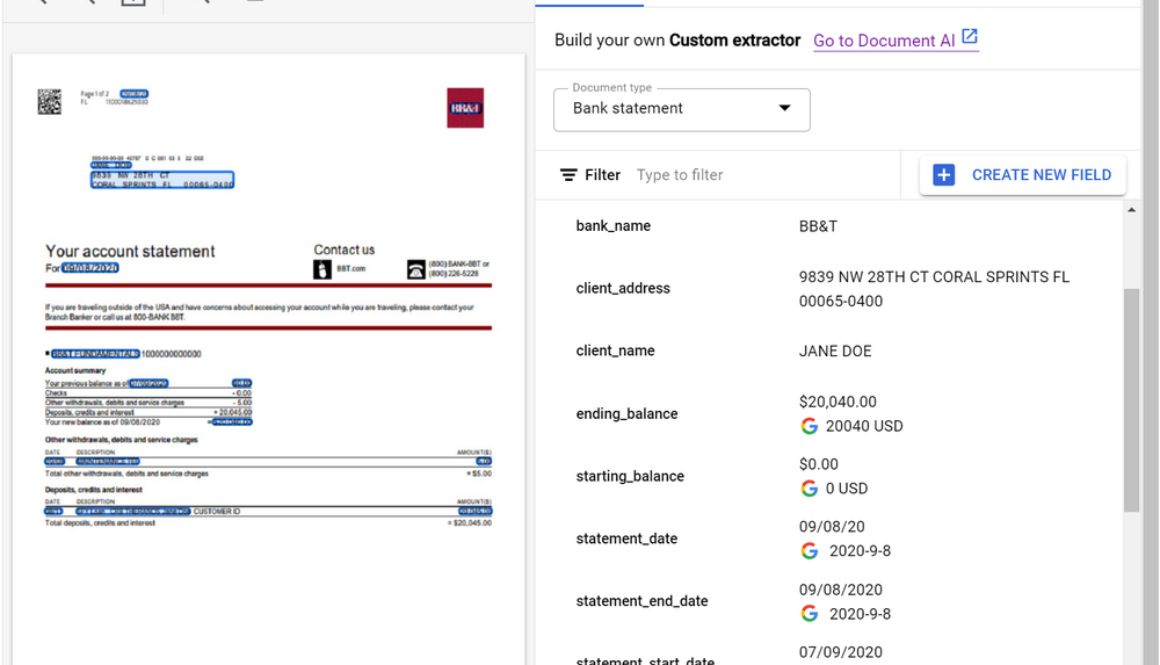
GCP – Document AI Custom Extractor, powered by gen AI, is now Generally Available
Today, we are excited to announce that the Document AI Custom Extractor, powered by generative AI, is Generally Available (GA), open to all customers, and ready for production use through APIs and the Google Cloud Console. The Custom Extractor, built with Google’s foundation models, helps parse data from structured and unstructured documents quickly and with high accuracy.
In the past, developers trained discrete models by using thousands of samples for each document type and spending a significant amount of time to achieve production-ready accuracy. In contrast, generative AI enables data extraction from a wide array of documents, with orders of magnitude less training data, and in a fraction of the time.
In spite of the benefits of this new technology, implementing foundation models across document processing can be cumbersome. Developers need to manage facets such as converting documents to text, managing document chunks, optimizing extraction prompts, developing datasets, managing model lifecycles, and more.
Custom Extractor, powered by generative AI, helps solve these challenges so developers can create extraction processors faster and more effectively. The new product allows for foundation models to be used out of the box, fine tuned, or used for auto-labeling datasets through a simple journey. Moreover, generative AI predictions are now covered under the Document AI SLA.
The result is a faster and more efficient way for customers and partners to implement generative AI for their document processing workflows. Whether to extract fields from documents with free-form text (such as contracts) or complex layouts (such as invoices or tax forms), customers and partners can now use the power of generative AI at an enterprise-ready level. Developers can simply post a document to an endpoint and get structured data in return with no training required.
What users are saying about Workbench
During public preview, developers cut time to production, obtained higher accuracies, and unlocked new use cases like extracting data from contracts. Let’s hear directly from a few customers:
“Our partnership with Google Cloud continues to provide innovative solutions for Iron Mountain’s Intelligent Document Processing (IDP) and Workflow Automation capabilities powered by Iron Mountain InSight®. Document AI’s Custom Extractor enables us to leverage the power of generative AI to classify and extract data from unstructured documents in a faster and more effective way. By using this new product and with features such as auto-labeling, we are able to implement document processors in hours vs days or weeks. We are able to then build repeatable solutions, which can be delivered at scale for our customers across many industries and geographies.” – Adam Williams, Vice President, Head of Platforms, Iron Mountain
“Our collaboration with Google marks a transformative leap in the Intelligent Document Processing (IDP) space. By integrating Google Cloud’s Document AI Custom Extractor with Automation Anywhere’s Document Automation and Co-Pilot products, we’re leveraging generative AI to deliver a game-changing solution for our customers. With the integration of the Custom Extractor, we are not just improving document field extraction rates; we are also accelerating deployment time by more than 2x and cutting ongoing system maintenance costs in half. We are excited to partner with Google to shape the next generation of Intelligent Document Processing solutions and revolutionize how organizations automate document-intensive business processes.” – Michael Guidry, Head of Intelligent Document Processing Strategy, Automation Anywhere
What else is new with Document AI Workbench
In addition, the latest Workbench updates make it even easier to automate document processing:
Price reduction- to better support production workloads, we reduced prices with volume-based tiers for Custom Extractor, Custom Classifier, Custom Splitter, and Form Parser For more information, see Document AI pricing.Fine tuning – Custom Extractor supports fine-tuning (Preview) so you can take accuracy to the next level by customizing foundation model results for your specific documents. Simply confirm extraction results within a dataset and fine-tune with a click of a button or an API call. This feature is currently available in the US region. For more information, see Fine tune and train by document type.Expanded region availability: predictions from the Custom Extractor with generative AI are now available in the EU and northamerica-northeast1 regions. For more information, see Custom Extractor regional availabilty.Version lifecycle management: As Google improves foundation models, older foundation models are deprecated. Similarly, older processor versions will be deprecated 6+ months after new stable versions are released. We are working on an auto-upgrade feature to simplify lifecycle management. For more information, see Managing processor versions.
Take the next step
To quickly see what the Custom Extractor with generative AI can do, check out the updated demo on the Document AI landing page. Simply load a sample document (15 page demo limit). In seconds you will see the power of generative AI extraction as shown below.
If you are a developer, head over to Workbench on the Google Cloud Console to create a new extractor and to manage complex fields or customize foundation models’ predictions for your documents.
Or, to learn more, review documentation for the Custom Extractor with generative AI, review Document AI release notes, or learn more about Document AI and Workbench.
Read More for the details.
GCP – Optimizing BigQuery computational analysis costs
BigQuery is a powerful and scalable petabyte-scale data warehouse known for its efficient SQL query capabilities, and is widely adopted by organizations worldwide.
While BigQuery offers exceptional performance, cost optimization remains critical for our customers. Together, Google Cloud and Deloitte have extensive experience assisting clients in optimizing BigQuery costs. In a previous blog post, we discussed how to reduce and optimize physical storage costs when implementing BigQuery. This blog post focuses on optimizing BigQuery computational costs through the utilization of the newly introduced BigQuery editions instead of the on-demand ($/TB) pricing model.
Selecting BigQuery editions slots with autoscaling is a compelling option for optimizing costs.
Design challenges
Many organizations select BigQuery’s on-demand pricing model for their workloads due to its simplicity and pay-per-query nature. However, the computational query analysis costs can be significant. Minimizing expenses associated with computational analysis is a prominent issue for some of our clients.
Deloitte helped clients to address the following challenges:
Conducting a proof of concept to compare BigQuery editions with on-demand costsWhere to manage BigQuery editions slotsHow to charge back to different departmentsWhich criteria to use to group projects into reservationsHow to share idle slots from one reservation to others to reduce wasteHow many slots to commit for maximum ROI
Read on to learn how to address the above mentioned challenges as you work to optimize costs on Google Cloud with BigQuery.
Recommended approach
First, if you are not familiar with BigQuery editions, we recommend that you readintroduction to BigQuery editions andintroduction to slots autoscaling.
On-demand vs. BigQuery editions
Then, let’s understand the key differences between on-demand and BigQuery editions. In the on-demand pricing model, each project can scale up to 2,000 slots for analysis. The price is based on the number of bytes scanned multiplied by the unit price, independent of the slot capacity used.
On the other hand, BigQuery editions are billed based on slot hours. BigQuery editions allows for autoscaling, meaning it can scale up to the maximum number of slots defined and scale down to zero once computational analysis jobs are finished. Note that there is a one-minute scale-down window.
If you have workloads that require more than 2,000 slots per project available in on-demand, you should use BigQuery editions with higher capacity requirements. Additionally, if you’re using Enterprise or Enterprise Plus editions, you can assign baseline slots for workloads that are sensitive to “cold start” issues, ensuring consistent performance. Finally, you have the option to make a one- or three-year slot commitment to lower the unit price by 20% or 40%, respectively. Note: baseline and committed slots are charged 24/7, regardless of job activity.
Setting up a slots admin project
Before creating a reservation, it’s essential to establish a BigQuery admin project within your organization dedicated solely to administering slots commitments and reservations. This project should not have any other workloads running inside it. By doing so, all slots charges are centralized in this project, streamlining administration.
There is value to managing all reservations in a single BigQuery admin project since idle and unallocated slots are only shared among reservations within the same administration project. This practice ensures efficient slot utilization and is considered a best practice.
Comparing BigQuery editions vs. on-demand costs
To determine whether BigQuery editions slots are more cost-effective than on-demand for your workload, conduct a proof of concept by selecting a project with high on-demand query consumption and try out the BigQuery editions slots model. First, create a reservation within the BigQuery admin project and assign a project to it. Start with 2,000 slots as the maximum reservation size, equivalent to the current on-demand capacity.
You can then use the BigQuery administrative charts to determine slot cost. Additionally, you can run a query using the JOBS information schema to find out how many bytes have been scanned in the project to calculate the cost with the “on-demand” pricing model.
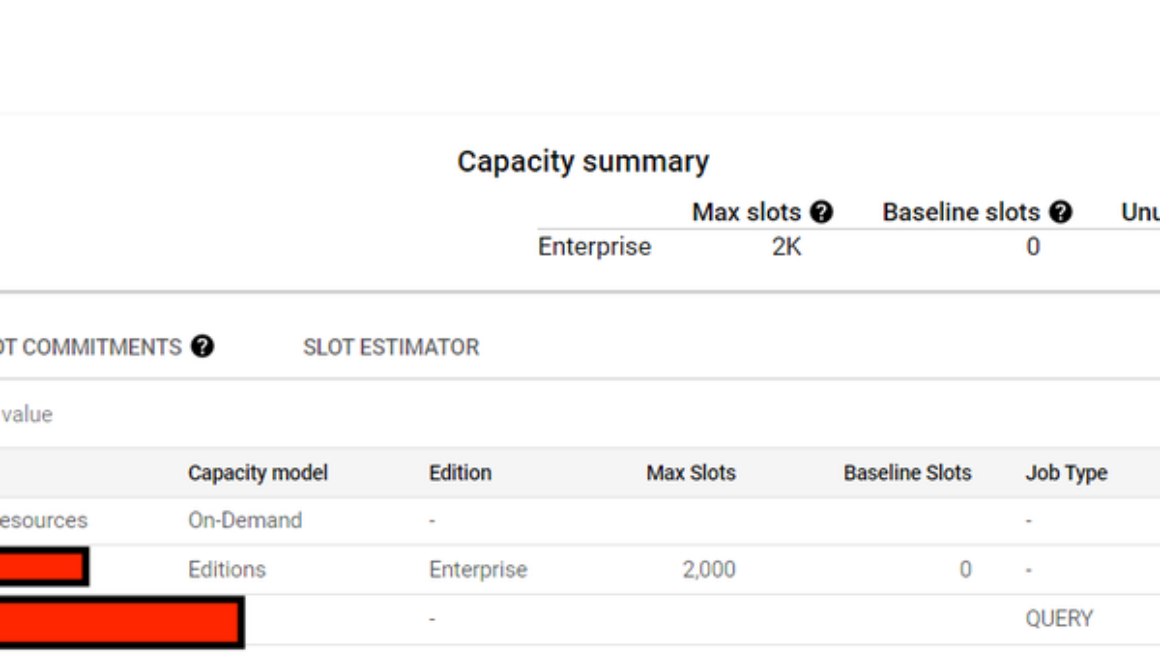
The following picture depicts a BigQuery slots reservation using Enterprise edition, with 2,000 max slots and 0 baseline slots without any commitment. Only one project has been assigned into this reservation to conduct a proof of concept:
Figure 1: Reservation with baseline and autoscaling slots.
Based on our experience, we saw huge benefits to leverage slots in our case. However, you must perform your own assessment as both slot-based and on-demand models offer value depending on your specific query requirements. For projects with minimal traffic volume and straightforward management needs, where most jobs or queries complete within seconds and data scans are limited, the on-demand model might be a more suitable choice.
Figure 2 and Figure 3 shows this comparison when using the BigQuery editions slot-cost model versus the on-demand model.
Figure 2: BigQuery editions slots costs.
From Figure 2, we see that the BigQuery editions slot cost is $1,641.
Figure 3: What-if using BigQuery on-demand costs.
Figure 3 shows a cost of $4,952 for the same time period when using BigQuery on-demand cost.
Figure 4 shows that the initial autoscaling slot size we used was too large. In Figure 7, you will see the recommended slot size from the slot estimator to allow you to reset the slot size for cost optimization.
Figure 4: The maximum number of auto-scaling slots is too large.
Managing reservations and chargeback
In the BigQuery editions slots model, all slot costs are recorded in the central BigQuery admin project. Chargeback to different departments becomes a crucial consideration when there are requirements to charge different departments or teams for resources consumed for billing and accounting purposes.
An upcoming BigQuery slot allocation billing report has lines for each reservation’s cost for each assigned query project. To facilitate chargeback, we recommend grouping projects based on their cost center, allowing for easy allocation. Until this new feature is available, you can run queries based on the BigQuery information schema to determine each project’s slot hours usage for chargeback purposes.
Grouping projects
To optimize slot usage, consider grouping projects based on different workload types, such as Business Intelligence (BI), standard Extraction Transformation Loading (ETL), and data science projects. Each reservation can have unique characteristics shared by the group, defining baseline and maximum slots requirements. Grouping projects by cost center is an approach for efficient chargeback, with each cost center belonging to different departments (e.g., BI, ETL, data science).
Utilizing idle slots
Idle slots can be shared to avoid waste. By default, queries running in a reservation automatically use baseline idle slots from other reservations within the same administration project. Autoscaling slots are not considered idle capacity, as they are removed when they are no longer needed. Idle capacity is preemptible back to the original reservation as needed, irrespective of the query’s priority. This automatic and real-time sharing of idle slots helps to ensure optimal utilization.
Inintroduction to slots autoscaling, this picture explains a reservation with idle slots sharing;
Figure 5: Reservation with baseline, autoscaling slots and idle slots sharing.
Reservations use and add slots in the following priority:
Baseline slotsIdle slot sharing (if enabled)Autoscale slots
For the ETL reservation, the maximum number of slots possible is the sum of the ETL baseline slots (700) and the dashboard baseline slots (300, if all slots are idle), along with the maximum number of auto scale slots (600). Therefore, the ETL reservation in this example could utilize a maximum of 1600 slots.
Determining the right commitment level
By committing to a one- or three-year plan, you can get a 20% or 40% discount on pay-as-you-go slots (PAYG). However, if your workloads mainly consist of scheduled jobs and are not always running, you might end up paying for idle slots 24/7. To find the best reservation settings, you can use the slot estimator tool to analyze your usage patterns and gain insights. The tool suggests the optimal commitment level based on your usage. It uses a simulation starting with 100 slots as a unit to find the best ROI for your commitment level. The screenshot below shows an example of the tool.
Figure 6: Slot estimator for optimal cost settings.
Presently, the Google Cloud console also provides recommendations onorganization-level BigQuery editions in a dashboard, enabling you to gain a comprehensive overview of the entire system.
Figure 7 BigQuery editions Recommender Dashboard
Additionally, optimizing slots usage together with a 3-year commitment can further reduce costs.
Let’s build
Transitioning from on-demand ($/TB) to slots using BigQuery editions presents a significant opportunity for reducing analytics costs. By following the step-by-step guidance on conducting a proof of concept and transitioning to the BigQuery editions slots model, organizations can maximize their cost optimization efforts. We wish you a productive and successful cost optimization journey as you build with BigQuery! As always, reach out to us for support here.
Read More for the details.
GCP – Simplify data loading with new enhancements to BigQuery Data Transfer Service
BigQuery makes it easy for you to gain insights from your data, regardless of its scale, size or location. BigQuery Data Transfer Service (DTS) is a fully managed service that automates the loading of data into BigQuery from a variety of sources. DTS supports a wide range of data sources, including first party data sources from the Google Marketing Platform (GMP) such as Google Ads, DV360 and SA360 etc. as well as cloud storage providers such as Google Cloud Storage, Amazon S3 and Microsoft Azure.
BigQuery Data Transfer Service offers a number of benefits, including:
Ease of use: DTS is a fully managed service, so you don’t need to worry about managing infrastructure or writing code. DTS can be accessed via UI, API or CLI. You can get started with loading your data in a few clicks within our UI.Scalability: DTS can handle large data volumes and a large number of concurrent users. Today, some of our largest customers move petabytes of data per day using DTS.Security: DTS uses a variety of security features to protect your data, including encryption and authentication. More recently, DTS has added capabilities to support regulated workloads without compromising ease-of-use.
Recent feature updates
Based on customer feedback, we launched a number of key feature updates in the second half of 2023. These updates include broadening our support for Google’s first party data sources, enhancing the current portfolio of connectors to incorporate customer feedback and improve user experience, platform updates to support regulated workloads, as well as other important security features.
Let’s go over these updates in more detail.
Supporting new data sources
Display and Video Ads 360 (DV360) – A new DTS connector (in preview) allows you to ingest campaign config and reporting data into BigQuery for further analysis. This connector will be beneficial for customers who want to improve their campaign performance, optimize their budgets, and target their audience more effectively.Azure Blob Storage – The new DTS connector for Azure Blob Storage and Azure Data Lake Storage (now GA) completes our support for all the cloud storage providers. This allows customers to automatically transfer data from Azure Blob Storage into BigQuery on a scheduled basis.Search Ads 360 (SA360) – We launched a new DTS connector (in preview) to support the new SA360 API. This will replace the current (and now deprecated) connector for SA360. Customers are invited to try the new connector and prepare for migration (from the current connector). The new connector is built using the latest SA360 API that includes platform enhancements as documented here.
Enhancing existing connectors
Google Ads: Earlier in 2023, we launched a new connector for Google Ads that incorporated the new Google Ads API. It also added support for Performance Max campaigns.
Recently, we enhanced the connector with a feature (in preview) to enable customers to create custom reports that use a Google Ads Query Language (GAQL) query. Customers have to use their existing GAQL queries on configuring a transfer. With this feature, customers will have an optimized data transfer that pulls in just the data they need and at the same time bring in newer fields that might not be supported in a standard Google Ads transfer.
Additionally, we added support for Manager Accounts (MCC) with a larger number of accounts (8K) for our larger enterprise customers.YouTube Content Owners: Expanded support for YouTube Content Owner by increasing the coverage of CMS reports by adding 27 new financial reports. You can find the details of all the reports supported here.Amazon S3: Enabled hourly ingestion from Amazon S3 (vs. daily ingestion previously) to improve data freshness. This has been a consistent customer requested feature to improve the freshness of data from S3.
Enhanced security and governance
Your data is only useful if you can access it in a trusted and safe way. This is particularly important for customers running regulated workloads. To that end, we enabled:
Customer-managed encryption keys (CMEK) support for scheduled queries, Cloud Storage transfers, and Azure Blob Storage transfersService Account support for additional data sources: Campaign Manager, Teradata, Google Play, Amazon Redshift, Search Ads 360, and Display & Video 360.Data residency and access transparency controls for scheduled queries and Cloud Storage transfers.Enabled support for Workforce Identity Federation for all data sources except for YouTube Channel Transfers.
Looking forward
As we look to 2024, we are excited to continue this rapid innovation with new connectors for marketing analytics, operational databases and enterprise applications. At the same time, we look to evolve our portfolio of connectors with capabilities that improve the “freshness” of data, and help customers with AI-assisted transformations.
Try BigQuery Data Transfer Service today and streamline loading your data into BigQuery!
Read More for the details.
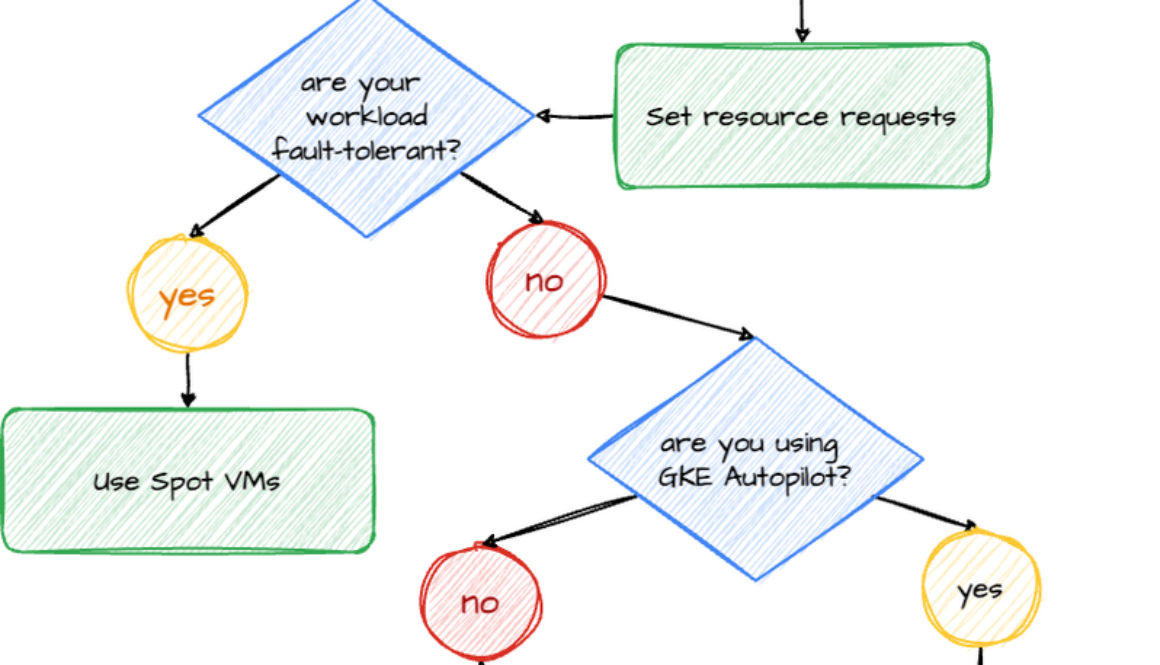
GCP – Google Cloud discounts: Five ways Kubernetes experts get more for less
As Kubernetes adoption grows, so do the challenges of managing costs for medium and large-scale environments. The State of Kubernetes Cost Optimization report highlights a compelling trend: “Elite performers take advantage of cloud discounts 16.2x more than Low performers.”
There are probably lots of reasons for this, but a couple might be these teams’ in-house expertise, proficiency in overseeing large clusters, and targeted strategies that prioritize cost-efficiencies, including Spot VMs and committed use discounts (CUD). In this blog post, we list the best practices you can follow to create a cost-effective environment on Google Kubernetes Engine (GKE), and an overview of the top various cloud discounts available to GKE users.
1. Understand your workload demands
Before selecting a cloud discount model to apply to your GKE environment, you need to know how much computing power your applications use, or you may end up overestimating your resource needs. You can do this by setting resource requests and rightsizing your workloads, helping to reduce costs and improve reliability. Alternatively, you can also create a VerticalPodAutoscaler (VPA) object to automate the analysis and adjustment of CPU and memory resources for Pods. And be sure to understand how VPA works before enabling it — it can either provide recommended resource values for manual updates or be configured to automatically update those values for your Pods.
2. Save up to 45% with GKE Autopilot Mode CUDs
GKE Autopilot shifts the mental model of Kubernetes cost optimization, in that you only pay for what resources your Pods request. But did you know that you can still take advantage of committed use on a per-Pod level? Reduce your GKE Autopilot costs with Kubernetes Engine (Autopilot Mode) committed use discounts. Autopilot Mode CUDs, which are based on one- and three-year commitments, can help you save 20% and 45% off on-demand prices, respectively. These discounts are measured in dollars per hour of equivalent on-demand spend. However, they do not cover GKE Standard, Spot pods, or management fees.
3. Save up to 46% off with Flexible CUDs
Flexible CUDs add flexibility to your spending capabilities by eliminating the need to restrict your commitments to a single project, region, or machine series. With Flexible CUDs, you can see a 28% discount over your committed hourly spend amount for a one-year commitment and 46% for a three-year commitment. With these spend-based commits, you can use vCPUs and/or memory in any of the projects within a Cloud Billing account, across any region, and that belong to any eligible general-purpose and/or compute-optimized machine type.
4. Save up to 70% off with resource-based CUDs
For GKE Standard, resources-based CUDs offer up to 37% off the on-demand prices for a one-year commitment, and up to 70% for a three-year commitment for memory-optimized workloads. GKE Standard CUDs cover only memory and vCPUs, and GPU commitments are subject to availability constraints. To guarantee that the hardware in your commit is available, we recommend you purchase commitments with attached reservations.
5. Save up to 91% with Spot VMs
Here’s a bold statement: Spot VMs can reduce your compute costs by up to 91%. They offer the same machine types, options, and performance as regular compute instances. But the preemptible nature of Spot VMs means that they can be terminated at any time. Therefore, they’re ideal for stateless, short-running batch jobs, or fault-tolerant workloads. If your application exhibits fault tolerance (meaning it can shut down gracefully within 15 seconds and is resilient to possible instance preemptions), then Spot instances can significantly reduce your costs.
CUDs, meanwhile, also offer substantial cost savings for businesses that leverage cloud services. To maximize these savings, be sure to allocate resources strategically, ensure that workloads are appropriately sized, and employ optimization tools to assist in sizing your CUDs. By allocating resources efficiently, you can avoid unnecessary costs while maintaining consistent application performance. Adhere to the guidelines in this article to enjoy notable savings on your cloud services.
To determine when to use Spot VMs and when to choose CUD, check out the diagram below.
The State of Kubernetes Cost Optimization report talks about all these techniques in depth. Get your copy now, and now and dive deeper into the insights by exploring the series of blogs derived from this report:
Setting resource requests: the key to Kubernetes cost optimizationMaximizing Reliability, Minimizing Costs: Right-Sizing Kubernetes WorkloadsHow not to sacrifice user experience in pursuit of Kubernetes cost optimizationImprove Kubernetes cost and reliability with the new Policy Controller policy bundle
Read More for the details.
GCP – Google Cloud upskills 100k in India through Google Developer Student Clubs
Students pursuing undergraduate degrees in engineering, computer science, IT, and other related fields: Are you curious about how to apply training and certifications to your real-life, day-to-day experience, or to upskill your technical capabilities? If so, this blog is for you.
In September and October 2023, approximately 100k students from 700 educational campuses in India completed the Google Cloud Computing Foundations course, learning generative AI skills that they can use on the job.
These students completed the course with help from learning content provided by Google Cloud Study Jams, community-led study groups run by Google Developer Student Clubs (GDSC). These study groups help aspiring developers get hands-on training in Google Cloud technologies, from containerizing applications to data engineering to machine learning and AI. They are set up as study parties, for a range of cloud topics and skill levels, and they can be tailored to group needs.
The study jam events in India had a significant impact for student learners and facilitators:
Students learned key foundational and technical skills to prepare them for their future careers.Student facilitators had the opportunity to gain a relevant Google Cloud certification.Nominated student facilitators gained leadership experience amongst their peers.
How it worked
The Google Developer Student Clubs team in India started by reaching out to Google Cloud Developer Advocate Romin Irani to train student facilitators nominated from each GDSC educational institution. This train-the-trainer program focused on generative AI and cloud computing basics, and ran as a series of live sessions every week. The facilitators were then ready to manage the learning experience for students at their campuses.
In turn, student facilitators trained their students using learning material that is available to anyone, at any time. We encourage you to go check it out yourself. Materials included:
Google Cloud Computing Foundations: Cloud Computing Fundamentals – Comprised of videos, labs and quizzes, this introductory content helps learners gain hands-on skills in Google Cloud infrastructure, networking, security, data, and AI and ML.The Arcade – This no-cost gamified learning experience offers gen AI technical labs and the opportunity to earn swag. The games change from month to month, and must be completed within the month. The students in India worked on prompt engineering games.
Facilitators chose how they wanted to train their students. Some facilitators let students go through the training independently, acting merely as a point person for troubleshooting. Some taught the content digitally, and some in-person. Many facilitators took a hybrid approach.
Here’s what Himanshu Jagdale had to say about the facilitator experience:
“Being a Cloud Facilitator in Google Cloud Study Jams was a game-changer for my certification journey. It not only deepened my understanding of Google Cloud, but also allowed me to share knowledge, and collaborate with other facilitators who really helped me during my Associate Cloud Engineer certification. The hands-on labs and expert sessions by Romin Irani enriched my practical skills, making a significant contribution to my success in achieving the Google Cloud Associate Cloud Engineer certification.”
Participant Adarsh Rawat said:
“The Google Cloud Study Jam program was immensely beneficial to me. The hands-on labs and modules assisted me in building concepts and covering the certification syllabus. Honestly, I am a big fan of labs, as they allow for the coverage of most vital topics at once.”
Get involved
If you’re a student with a passion for technology, we invite you to join a Google Developer Student Club near you — there are over 2100 Google Developer Student Clubs around the world, and joining one can help you learn, grow, and build a network of like-minded individuals, as well as find out about upcoming study jam opportunities. (If you’re not a student but looking to join a local community to stay connected and grow your skills, be sure to check out your local Google Developer Group.)
You can continue upskilling on Google Cloud by playing The Arcade at no-cost, with new games published regularly. Not only does The Arcade help you learn new hands-on technical skills, it also lets you gain points to use towards cool Google Cloud swag.
You can also visit Google Cloud Skills Boost for on-demand, role-based training to help you build your skills and validate your knowledge, any time, anywhere. You’ll find a variety of training options for in-demand job roles, like data analyst, security engineer, cloud engineer, machine learning engineer, and more, at levels ranging from introductory to advanced.
Start 2024 strong by upskilling with Google Cloud.
Read More for the details.
GCP – Getting started with AI notebooks and Jupyterhub on GKE
The recent growth in distributed, compute-intensive ML applications has prompted data scientists and ML practitioners to find easy ways to prototype and develop their ML models. Running your Jupyter notebooks and JupyterHub on Google Kubernetes Engine (GKE) can provide a way to run your solution with security and scalability built-in as core elements of the platform.
GKE is a managed container orchestration service that provides a scalable and flexible platform for deploying and managing containerized applications. GKE abstracts away the underlying infrastructure, making it easy to deploy and manage complex deployments.
Jupyterhub is a powerful, multi-tenant server-based web application that allows users to interact with and collaborate on Jupyter notebooks. Users can create custom computing environments with custom images and computational resources in which to run their notebooks. “Zero to Jupyterhub for Kubernetes” (z2jh) is a Helm chart that you can use to install Jupyterhub on Kubernetes that provides numerous configurations for complex user scenarios.
We are excited to announce a solution template that will help you get started with Jupyterhub on GKE. This greatly simplifies the use of z2jh with GKE templates, offering a quick and easy way to set up Jupyterhub by providing a pre-configured GKE cluster, Jupyterhub config, and custom features. Further, we added features such as authentication and persistent storage and cut down the complexity for model prototyping and experimentation. In this blog post, we discuss the solution template, the Jupyterhub on GKE experience, unique characteristics that come from running on GKE, and features such as a custom authentication and persistent storage.
The Jupyter on GKE experience
Running Zero to Jupyterhub on GKE provides a powerful platform for ML applications but the installation process is complicated. To ensure ML practitioners have minimal friction, our solution templates abstract away the infrastructure setup and solve common enterprise platform challenges including authentication and security, and persistent storage for notebooks.
Security and Auth
Granting the correct access to the notebooks can be especially difficult when working with sensitive data. By default, Jupyterhub exposes a public endpoint that anyone can access. This endpoint should be locked down to prevent unintended access. Our solution leverages Identity-Aware Proxy (IAP) to gate access to the public endpoint. IAP creates a central authorization layer for the Jupyterhub application access by HTTPS, utilizing the application-level access model and enabling IAM-based access control to the notebook to make users’ data more secure. Adding authentication to Jupyterhub ensures user validity and notebook security.
By default, the template reserves an IP address through Google Cloud IAP. Platform administrators can alternatively provide a domain to host their Jupyterhub endpoint, which will be guarded by IAP. Once IAP is configured, the platform administrator must update the service allowlist by granting users the role of “IAP-secure Web App User.” You can see how to allow access to the deployed Jupyterhub in the image below and as described here:
Now when a user navigates to the Jupyterhub endpoint gated behind IAP, they are presented with a Google login screen (shown below) to log in with their Google identity.
Persistent storage
Running Jupyterhub on GKE does not come with an out-of-the-box persistent storage solution, so notebooks are lost when the clusters are deleted. To persist notebook data, our templates provide options to integrate with Google storage solutions like Filestore, GCSFuse, andCompute Engine Persistent Disk. Each of these offer different features for different use cases:
Filestore – Supports dynamic provisioning and standard POSIX. Although the persistent volumes come with a minimum size of 1Ti for the standard tier, they provide multishare support to optimize costs.GCSFuse – Uses Cloud Storage buckets as the persistent volume but requires manual bucket creation i.e., the platform engineer must provision a bucket for each user. Cloud Storage can be managed via the UI support in the Google Cloud console and access control can be configured via IAM.Compute Engine Persistent Disk – Supports dynamic provisioning and can automatically scale while supporting different disk types.
To learn more about storage solutions, check out this guide.
Solution overview
The solution template uses Terraform with Helm charts to provision JupyterHub. Follow the step-by-step instructions in the README file to get started. The solution contains two groups of resources: platform-level and jupyterhub-level.
Platform-level resources are expected to be deployed once for each development environment by the system administrator. This includes common infrastructure and Google Cloud service integrations that are shared by all users. System administrators can also reuse already deployed development environments as well.
GKE Cluster and node pool – Configured in the main.tf file, this module deploys a GKE cluster with a GPU node pool. GKE also provides alternative GPU and machine types.Kubernetes System namespaces and service accounts, along with necessary IAM policy bindings.
The following resources are created when the system admins install Jupyterhub on the cluster. System administrators will be required to reinstall to apply any changes made to Jupyterhub configuration, i.e., the changes listed here.
Jupyterhub z2jh server – Spins up Jupyter notebook environments for users.IAP-related k8s deployments – This includes the Ingress, Backend Configuration, and Managed Certificate that integrates Google Cloud IAP with JupyterhubDepending on the user’s choice, storage volumes will be created by Filestore, GCSFuse, or Persistent Disk.
Customizable user profiles/resources
GKE’s flexible container customization and nodepool configurations work well with Jupyter’s concept of notebook profiles. Jupyterhub configuration offers a customizable number of preset profiles with predetermined Jupyter notebook images, memory, CPUs, GPUs, and many more. Using profiles, engineers can leverage GKE infrastructure like GPUs and TPUs to run their notebooks.
Better together: Jupyter and GKE
The combination of Jupyter and GKE offers a powerful yet simple solution for building, running, and managing AI workloads. Jupyterhub’s ease-of-use makes it a popular choice for machine learning models and data exploration. With GKE, Jupyterhub can go further by becoming more scalable and reliable.
You can also learn about running Jupyterhub with Ray here.
If you have any questions about using Jupyterhub with GKE, please raise an issue on our Github. Learn more about building AI Platforms with GKE by visiting our User Guide.
Read More for the details.